
Power Apps
Rencore monitors Power Apps across 38 governance policies, 25 reports, and 8 inventories covering environments, apps, connections, custom connectors, DLP, solutions, and Power Pages, detecting sprawl, premium-license risk, DLP gaps, and unmanaged solutions automatically.
Rencore Power Apps governance is a set of 38 policies, 25 reports, 23 segments, and 8 inventories that audit Power Apps environments, apps, connections, custom connectors, DLP policies, solutions, and Power Pages sites. It detects apps requiring a premium license, canvas apps without owners, apps shared with everyone, DLP policies that block no connectors, unmanaged solutions, and Power Pages sites without custom domains, giving IT a tenant-wide view of the citizen-developer landscape.
See Power Apps in Rencore
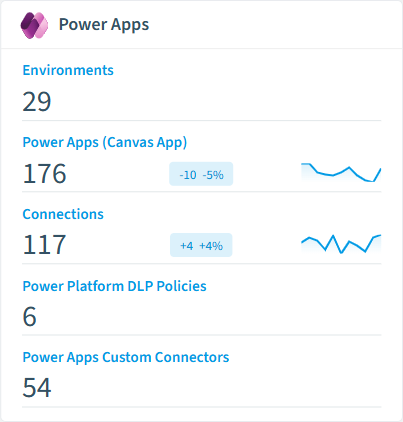
Every Power Apps object Rencore discovers and inventories across your tenant.
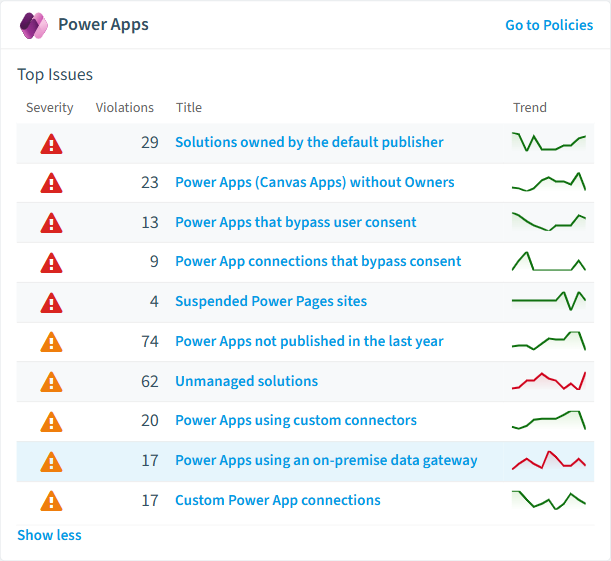
The governance policies Rencore evaluates against Power Apps, with severity and category.
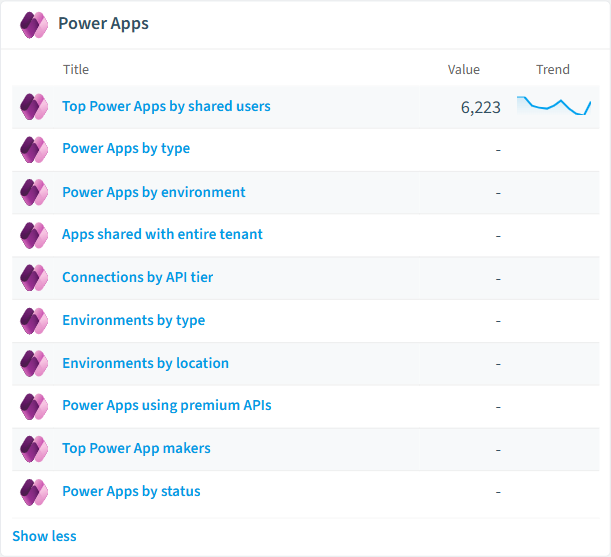
Built-in Power Apps reports and analytics views in Rencore.
The Power Apps governance dashboard, summarizing risks and status at a glance.
Why govern Power Apps with Rencore
Control app sprawl and ownership
Detect canvas apps without owners, apps inactive for 90 days, apps not published in the last year, apps without descriptions, apps shared with more than 100 users, and apps shared with everyone. Prioritize cleanup by usage and exposure.
Surface premium-license risk
Flag apps requiring a premium license, apps relying on grandfathered premium APIs, connections using a premium API tier, and custom connectors classified as premium. Right-size your Power Platform spend before audit.
Govern DLP, connectors, and consent
Find DLP policies that block no connectors, default-to-General DLP, custom connectors without privacy policy or maintainer contact, on-premise connections, and apps and connections that bypass user consent. Close the gaps before sensitive data leaks.
Manage solutions and Power Pages
Inventory unmanaged solutions, solutions owned by the default publisher, solutions without a publisher prefix or identifiable owner, plus inactive or trial Power Pages sites and production sites without a custom domain.
What Rencore discovers
Rencore automatically inventories these Power Apps object types.
How Power Apps governance works in Rencore
Rencore connects to Power Apps via the Power Platform API and inventories eight object types: environments, canvas apps, connections, app versions, DLP policies, custom connectors, solutions, and Power Pages sites. The 38 policies run on every scan cycle, evaluating each object against sprawl, licensing, DLP, connector, solution, and Power Pages rules with severity levels.
Who uses Power Apps governance
M365 product owners use the 23 reusable segments and 25 reports to size the citizen-developer footprint and right-size premium licensing. IT administrators rely on DLP and custom-connector policies to keep sensitive data inside approved boundaries. CISOs use consent-bypass and on-premise connection policies as part of broader Power Platform risk reviews. The output complements Power Automate and Power BI governance for a unified Power Platform view.
Getting started
Connect your Microsoft 365 tenant. All 38 Power Apps policies activate on first scan alongside your existing M365 governance, with no per-environment configuration required. Reports cover apps by environment, premium-API usage, DLP scope, and Power Pages status, so platform owners can see exposure at a glance.
Policies
38 governance rules that detect violations and risks.
Need a rule that isn't listed? Rencore's Policy Builder lets you create custom policies tailored to your organization.
Reports
25 analytics views and dashboards.
Segments
23 data groupings for targeted filtering.
Frequently asked questions
What governance areas does Rencore cover?
What is Rencore governance?
How do Rencore policies work?
Related guides
Trusted by










