
Connectors · OpenAI Private Preview

OpenAI

Rencore monitors OpenAI across 25 governance policies, 11 reports, and 17 inventories, detecting cost overruns, API key risks, and project sprawl automatically.

AI & Agents
Published For Head of IT, CISO, CIO / CXO

OpenAI is in private preview. Join the waiting list and we will reach out when access opens up.

Join the waiting list

Rencore OpenAI governance is a set of 25 policies, 11 reports, 9 segments, and 17 inventories that audit OpenAI organizations, projects, users, API keys, and usage for security gaps, cost overruns, and operational risks. It detects organizations with too many owners, API keys not rotated in 90 days, projects exceeding budget thresholds, and inactive users consuming seats.

88 governance capabilities: 17 inventories · 25 policies · 11 reports · 9 segments · 8 automations · 4 provisioning templates

Why govern OpenAI with Rencore

  • Secure API key lifecycle

    Detect API keys not rotated in 90 days, unused keys still active, and keys with excessive permissions. Automate key cleanup with approval-based workflows to minimize your attack surface.

  • Control AI spending

    Track costs at the organization, project, and user level. Policies alert when spending exceeds thresholds. Reports break down costs by model, project, and time period for full budget accountability.

  • Manage organization access

    Find organizations with too many or too few owners, users not linked to Entra ID, and external users without documented business justification. Enforce consistent access governance.

  • Track adoption and usage

    Reports show model usage trends, most active projects, token consumption by team, and API call patterns. Identify underused projects and optimize your OpenAI investment.

What Rencore discovers

Rencore automatically inventories these OpenAI object types.
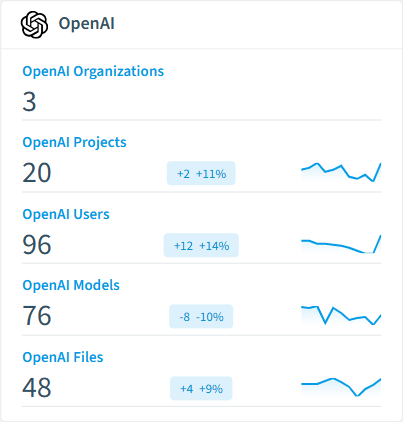
  • OpenAI Organization

    OpenAI organizations that are configured to be scanned

  • OpenAI Project

    Represents an individual project

  • OpenAI User

    Represents an individual user within an organization

  • OpenAI Invite

    Represents an individual invite to the organization

  • OpenAI Admin API Key

    Represents an individual Admin API key in an org

  • OpenAI Project API Key

    Represents an individual API key in a project

OpenAI inventory card in Rencore

How OpenAI governance works in Rencore

Rencore connects to OpenAI via the OpenAI Admin API and inventories organizations, projects, users, API keys, service accounts, and usage data. Policies run on every scan cycle and flag security, cost, and operational issues with severity levels and recommended actions.

The enterprise AI governance challenge

Organizations deploying OpenAI at scale face the same governance challenges as any enterprise SaaS, amplified by per-token cost models and API key proliferation. Without governance, API keys accumulate without rotation, project costs spike unpredictably, and offboarded employees retain access to AI resources.

Who uses OpenAI governance

CISOs use API key policies to enforce rotation schedules and detect orphaned credentials. Heads of IT track cost trends across organizations and projects. CIOs compare OpenAI usage with other AI platforms to inform their enterprise AI strategy.

Getting started

Provide Rencore with OpenAI Admin API credentials. All 25 policies activate on first scan, covering organizations, projects, users, and API keys. No per-project configuration required.

Policies

25 governance rules that detect violations and risks.
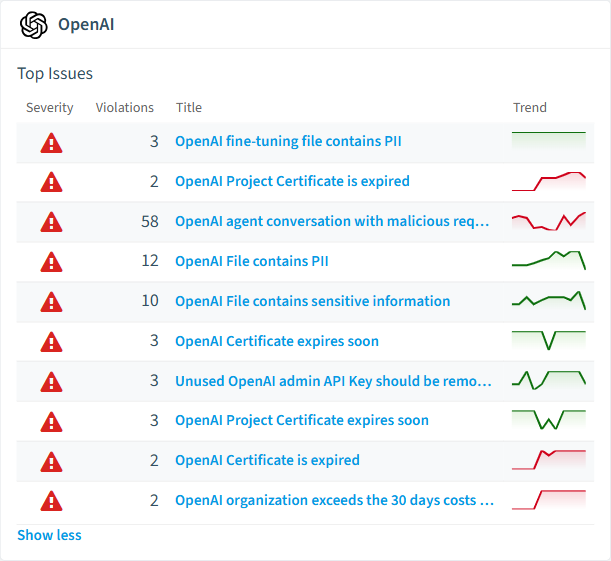
OpenAI policies card in Rencore
  • OpenAI Organizations with too less owners

    Detects organizations that has less than 2 owners

    High Security
  • OpenAI Organizations with too many owners

    Detects organizations that has more than 5 owners

    High Security
  • OpenAI Project with too many owners

    Detects projects with more than 10 owners

    High Security
  • OpenAI agent conversation with malicious request

    Detects a chat which might be used to extract sensitive information

    High Security
  • OpenAI File contains PII

    Detects uploaded files which contain Personally Identifiable Information for training

    High Security
  • OpenAI File contains sensitive information

    Detects uploaded files which contain company, medical or financial data

    High Security

Need a rule that isn't listed? Rencore's Policy Builder lets you create custom policies tailored to your organization. Learn more about the Policy Builder

Reports

11 analytics views and dashboards.
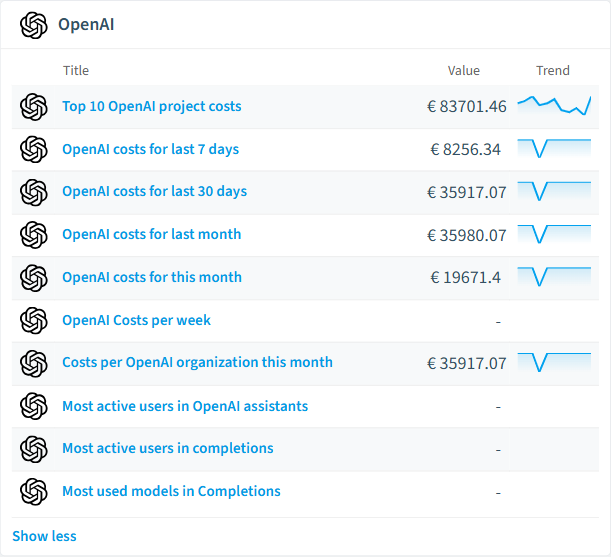
  • OpenAI costs for last 7 days

    Shows the costs per organization in the last 7 days

    Bar Chart · Costs

  • OpenAI costs for last 30 days

    Shows the costs per organization in the last 30 days

    Bar Chart · Costs

  • OpenAI costs for last month

    Shows the costs per organization in the last month

    Bar Chart · Costs

  • OpenAI costs for this month

    Shows the costs per organization in this month

    Bar Chart · Costs

  • OpenAI Costs per week

    Shows the costs per week broken down by OpenAI organization

    Column Chart · Costs

  • Top 10 OpenAI project costs

    Shows the top 10 projects with the highest costs

    Bar Chart · Costs

OpenAI reports card in Rencore

Automations

8 automated remediation workflows.

  • Archive OpenAI Project

    Automatically archives an OpenAI Project after approval by an owner

  • Delete OpenAI Organization Certificate

    Automatically deletes an OpenAI organization certificate after approval by an organization owner

  • Delete OpenAI Project Certificate

    Automatically deletes an OpenAI project certificate after approval by a project owner

  • Delete OpenAI User

    Automatically deletes an OpenAI user after approval by an organization owner

  • Delete OpenAI Invite

    Automatically deletes an OpenAI invite after approval by an organization owner

  • Delete OpenAI Admin API Key

    Automatically deletes an OpenAI admin API key after approval by an organization owner

  • Delete OpenAI Project API Key

    Automatically deletes an OpenAI project API key after approval by a project owner

  • Delete OpenAI File

    Automatically deletes an OpenAI file after approval by a project owner

Segments

9 data groupings for targeted filtering.

  • Active OpenAI Projects

    Shows OpenAI projects that are active

  • Archived OpenAI Projects

    Shows OpenAI projects that have been archived

  • External OpenAI Users

    Shows OpenAI users who are external (guest) users in Entra ID

  • High-Cost OpenAI Projects

    Shows OpenAI projects with costs exceeding 500 EUR in the last 30 days

  • OpenAI Fine-Tuning Files

    Shows files uploaded for fine-tuning purposes

  • Pending OpenAI Invites

    Shows invitations that are still pending acceptance

  • OpenAI Owner Service Accounts

    Shows service accounts with owner-level privileges

  • Recently Created OpenAI Projects

    Shows OpenAI projects created within the last 30 days

  • OpenAI Admin API Keys

    Shows all admin-level API keys across the organization

Provisioning Templates

4 resource creation templates.

  • Create OpenAI Project with approval

    Request a new OpenAI project with approval of your manager

  • Create OpenAI Admin API Key with approval

    Request a new OpenAI Admin API Key with approval of your manager

  • Create OpenAI Organization Certificate with approval

    Request to upload a new OpenAI Organization Certificate with approval of your manager

  • Invite user to OpenAI with approval

    Request to send an OpenAI organization invite with approval of your manager

Frequently asked questions

Does Rencore support governance for AI tools beyond Microsoft Copilot?
Yes. Rencore connects to Claude, OpenAI, Gemini, GitHub Copilot, Cursor, Windsurf, AWS Bedrock, Azure AI Foundry, and other AI platforms. Each connector provides tailored policies for cost management, security, adoption tracking, and access control, giving IT a unified governance view across all AI tools the organization uses.
What is Rencore governance?
Rencore governance is a SaaS platform that continuously monitors your Microsoft 365 tenant for policy violations, configuration drift, and security risks across SharePoint, Teams, Power Platform, Copilot, and AI Agents. It automates compliance evidence collection, surfaces oversharing and sprawl, and provides actionable remediation workflows, reducing manual audit effort by up to 80%.
How do Rencore policies work?
Rencore ships with hundreds of pre-built policies that detect governance violations across every connector, oversharing, sprawl, cost overruns, security risks, and compliance gaps. Policies run on a continuous schedule, evaluate each discovered object against configurable rules, and flag violations with severity (High, Medium, Low), category, and a recommended action.

Trusted by

MAPALBAMVille de LuxembourgWACKERGRUNDFOSAMGENOsramLufthansaHoneywellThyssenKruppSunrisePattern

See Rencore in your tenant

Connect your environment in minutes and surface the governance findings that matter on day one.







