
GitHub Copilot
Rencore monitors GitHub Copilot across 20 governance policies, 3 reports, and 8 inventories, detecting unused seats, low adoption, and content exclusion gaps automatically.
GitHub Copilot is in private preview. Join the waiting list and we will reach out when access opens up.
Join the waiting listRencore GitHub Copilot governance is a set of 20 policies, 3 reports, 6 segments, and 8 inventories that audit GitHub Copilot seat assignments, daily usage metrics, language and editor usage, content exclusions, and organization settings. It detects seats assigned to inactive users, organizations with low adoption rates, and missing content exclusions for sensitive repositories.
See GitHub Copilot in Rencore
Every GitHub Copilot object Rencore discovers and inventories across your tenant.
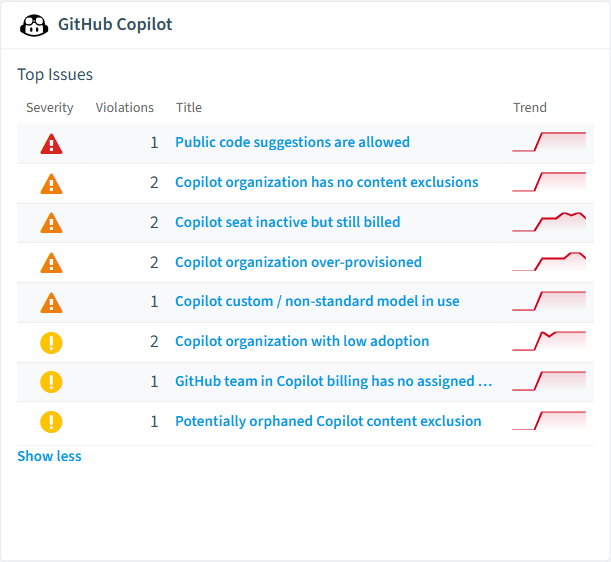
The governance policies Rencore evaluates against GitHub Copilot, with severity and category.
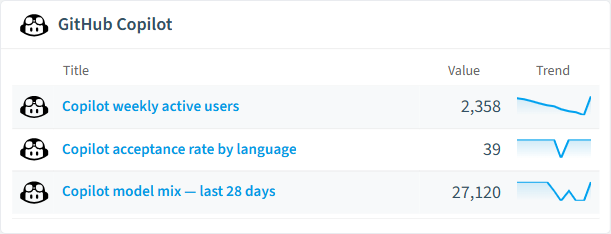
Built-in GitHub Copilot reports and analytics views in Rencore.
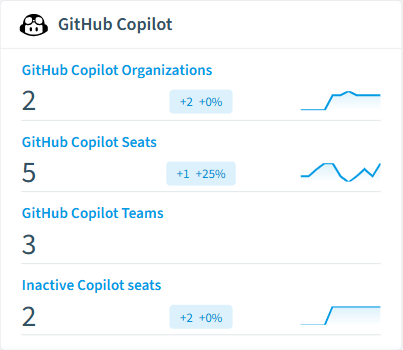
The GitHub Copilot governance dashboard, summarizing risks and status at a glance.
Why govern GitHub Copilot with Rencore
Optimize seat utilization
Detect Copilot seats assigned to users inactive for 30+ days, seats for users deactivated in Entra ID, and organizations where actual usage is below the seat count. Reclaim wasted licenses.
Enforce content exclusions
Identify repositories missing content exclusion rules that prevent Copilot from processing sensitive codebases. Ensure intellectual property and regulated code stays out of AI suggestions.
Track adoption and productivity
Reports show daily suggestion acceptance rates, most active languages, editor distribution, and model usage per organization. Compare adoption across teams and repositories.
What Rencore discovers
Rencore automatically inventories these GitHub Copilot object types.
How GitHub Copilot governance works in Rencore
Rencore connects to GitHub via the GitHub API and inventories Copilot seat assignments, daily usage metrics, language and editor breakdown, content exclusions, and organization-level settings. Policies run on each scan cycle and flag seat waste, adoption gaps, and security issues.
Who uses GitHub Copilot governance
Heads of IT use seat utilization policies to justify Copilot spend and recover unused licenses. CISOs enforce content exclusion policies to protect sensitive repositories. Engineering leads use adoption reports to identify teams that benefit most from AI-assisted coding.
Getting started
Provide Rencore with a GitHub Personal Access Token or App with organization admin scope. All 20 policies activate on first scan, covering seats, usage, and content exclusions automatically.
Policies
20 governance rules that detect violations and risks.
Need a rule that isn't listed? Rencore's Policy Builder lets you create custom policies tailored to your organization.
Reports
3 analytics views and dashboards.
Automations
4 automated remediation workflows.
Segments
6 data groupings for targeted filtering.
Frequently asked questions
Does Rencore support governance for AI tools beyond Microsoft Copilot?
What is Rencore governance?
How do Rencore policies work?
Related guides
Related reading
- AWS BedrockRencore monitors AWS Bedrock across 30 governance policies, 15 reports, and 19 inventories, detecting model access risks, cost overruns, and usage anomalies automatically.
- Microsoft FoundryRencore inventories Azure AI Foundry with 6 inventory types covering projects, hubs, model deployments, and connections for full AI platform visibility.
- Anthropic ClaudeRencore monitors Anthropic Claude across 26 governance policies, 14 reports, and 11 inventories, covering costs, security, adoption, and data protection for your Claude organization.
Trusted by










