
Box
Rencore monitors Box across 26 governance policies, 12 reports, and 11 inventories, detecting open shared links, external collaboration risks, and retention violations automatically.
Box is in private preview. Join the waiting list and we will reach out when access opens up.
Join the waiting listRencore Box governance is a set of 26 policies, 12 reports, 11 segments, and 11 inventories that continuously audit Box for external sharing violations, retention policy gaps, and user lifecycle issues. It detects shared links open to anyone on the internet, folders with unrestricted external collaboration, expired shared links still active, and users deactivated in Entra ID who retain Box access.
See Box in Rencore
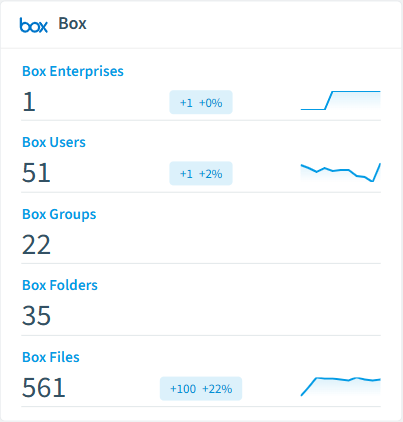
Every Box object Rencore discovers and inventories across your tenant.
The governance policies Rencore evaluates against Box, with severity and category.
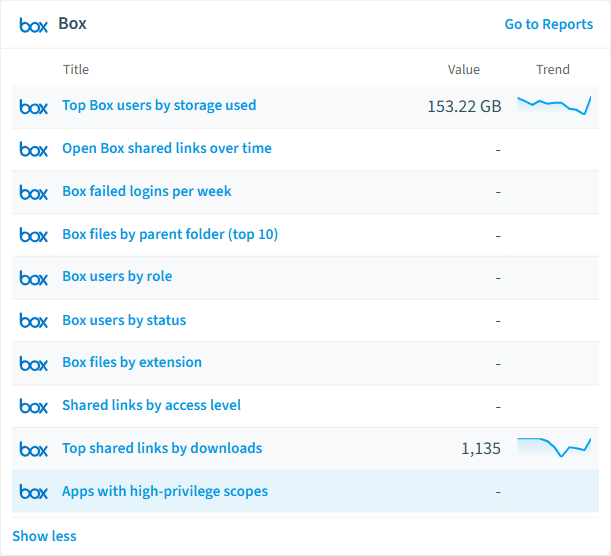
Built-in Box reports and analytics views in Rencore.
The Box governance dashboard, summarizing risks and status at a glance.
Why govern Box with Rencore
Stop external oversharing
Detect shared links open to anyone, folders allowing external collaboration without restriction, and shared links missing password protection or expiration dates. Prioritize by content sensitivity and exposure level.
Enforce retention and legal holds
Find folders missing retention policies, files outside legal hold scope that should be preserved, and retention assignments that conflict with business requirements.
Manage user lifecycle
Identify Box users deactivated in Entra ID who still have active access, external collaborators without business justification, and app authorizations granted to unvetted third-party applications.
Track content and collaboration
Reports show sharing trends, most-accessed folders, collaboration patterns, and storage consumption. Segment users by department, role, and activity level.
What Rencore discovers
Rencore automatically inventories these Box object types.
How Box governance works in Rencore
Rencore connects to Box via the Box API and inventories folders, files, shared links, collaborations, users, groups, app authorizations, retention policies, and legal holds. It links Box users to M365 users by login email, enabling cross-platform identity governance. Policies run on every scan cycle and flag violations with severity and recommended actions.
The multi-platform content governance challenge
Organizations using Box alongside SharePoint and OneDrive face fragmented sharing controls. A file shared openly on Box is invisible to Microsoft Purview. Rencore brings Box content governance into the same dashboard as your M365 governance, applying consistent oversharing detection across both platforms.
Who uses Box governance
IT administrators use it to maintain clean sharing hygiene across Box instances. CISOs rely on external access policies to detect data exposure risks. Heads of IT use the reports to compare sharing patterns between Box and Microsoft 365 content platforms.
Getting started
Provide Rencore with Box API credentials (OAuth 2.0 or JWT). All 26 policies activate on first scan, covering files, folders, shared links, and users. Rencore automatically links Box users to Entra ID for cross-platform identity governance.
Policies
26 governance rules that detect violations and risks.
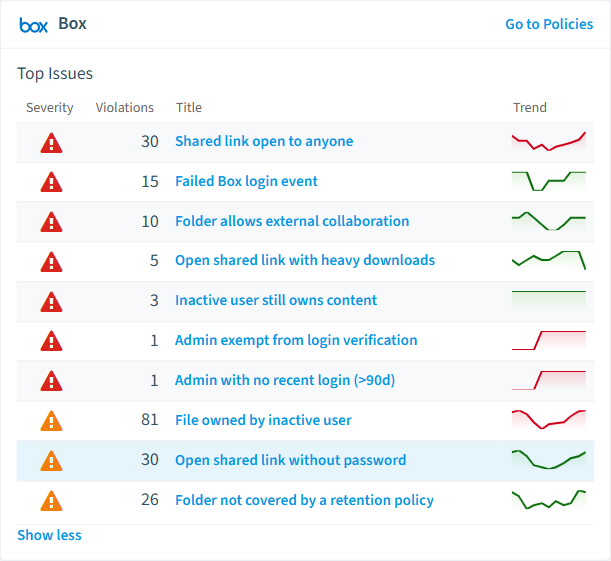
Need a rule that isn't listed? Rencore's Policy Builder lets you create custom policies tailored to your organization.
Reports
12 analytics views and dashboards.
Automations
4 automated remediation workflows.
Segments
11 data groupings for targeted filtering.
Frequently asked questions
What governance areas does Rencore cover?
What is Rencore governance?
How do Rencore policies work?
Related guides
Trusted by










