
Connectors · Amazon Private Preview

AWS Bedrock

Rencore monitors AWS Bedrock across 24 governance policies, 15 reports, and 19 inventories, detecting model access risks, cost overruns, and usage anomalies automatically.

AI & Agents
Published For Head of IT, CISO, CIO / CXO

AWS Bedrock is in private preview. Join the waiting list and we will reach out when access opens up.

Join the waiting list

Rencore AWS Bedrock governance is a set of 24 policies, 15 reports, 19 inventories, and 4 provisioning templates that audit Amazon's Bedrock platform for security gaps, cost overruns, and operational risks. It detects models accessed without proper guardrails, agents with excessive permissions, knowledge bases with stale data sources, and spending spikes across model invocations, giving IT full visibility into enterprise generative AI usage on AWS.

86 governance capabilities: 19 inventories · 24 policies · 15 reports · 16 segments · 1 automations · 4 provisioning templates

Why govern AWS Bedrock with Rencore

  • Control model access and guardrails

    Detect Bedrock models invoked without guardrail policies, agents with overly broad permissions, and knowledge bases connected to sensitive data sources. Each finding includes severity and recommended remediation.

  • Manage generative AI costs

    Track spending across model invocations, foundation models, and custom models. Policies alert when costs exceed thresholds at the account, project, or model level. Reports break down spending by model, region, and team.

  • Monitor adoption and usage patterns

    Reports show which foundation models teams use most, invocation trends over time, token consumption by project, and agent activity. Identify underused provisioned throughput that can be released.

What Rencore discovers

Rencore automatically inventories these AWS Bedrock object types.
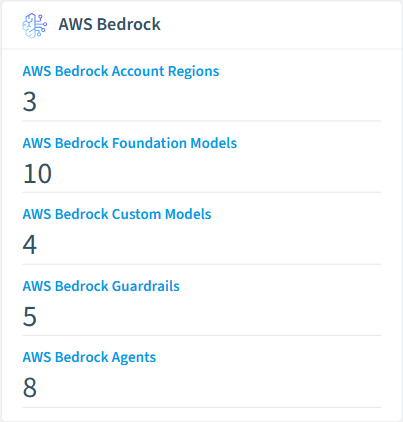
  • AWS Bedrock Account Region

    An AWS account and region combination representing a Bedrock deployment scope

  • AWS Bedrock Foundation Model

    Available AI foundation models in AWS Bedrock that can be used for inference

  • AWS Bedrock Custom Model

    Custom fine-tuned or distilled models created in AWS Bedrock

  • AWS Bedrock Guardrail

    Content filtering guardrails that control AI model inputs and outputs in AWS Bedrock

  • AWS Bedrock Agent

    AI agents that orchestrate foundation models, knowledge bases, and action groups in AWS Bedrock

  • AWS Bedrock Knowledge Base

    Knowledge bases for retrieval-augmented generation (RAG) in AWS Bedrock

AWS Bedrock inventory card in Rencore

How AWS Bedrock governance works in Rencore

Rencore connects to AWS Bedrock via the AWS API and inventories foundation models, custom models, agents, knowledge bases, guardrails, and provisioned throughput across your accounts. Policies run on every scan cycle and evaluate each resource against governance rules, flagging security, cost, and operational issues.

The multi-cloud AI governance challenge

Organizations running generative AI on AWS Bedrock alongside Microsoft 365 Copilot and other AI tools need a single view of AI governance across all platforms. Rencore provides that unified view, applying consistent governance policies whether your AI workloads run on AWS, Azure, or third-party platforms.

Who uses AWS Bedrock governance

CISOs use it to enforce guardrail policies and monitor which models have access to sensitive data. Heads of IT track cost trends and identify optimization opportunities across Bedrock accounts. CIOs use adoption reports to measure ROI on their generative AI investments.

Getting started

Provide Rencore with AWS API credentials scoped to Bedrock. All 24 policies activate on first scan, covering models, agents, knowledge bases, and guardrails. No per-model configuration required.

Policies

24 governance rules that detect violations and risks.
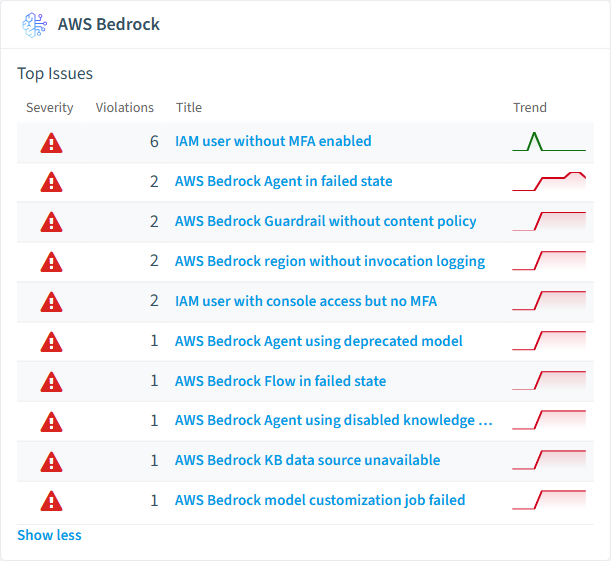
AWS Bedrock policies card in Rencore
  • AWS Bedrock Agent using deprecated model

    Detects agents using foundation models with LEGACY or EOL lifecycle status

    High Security
  • AWS Bedrock Agent in failed state

    Detects agents with FAILED or NOT_PREPARED status

    High Operation
  • AWS Bedrock Flow in failed state

    Detects flows with Failed status

    High Operation
  • AWS Bedrock Guardrail without content policy

    Detects guardrails that do not have a content filtering policy configured

    High Security
  • AWS Bedrock region without invocation logging

    Detects account regions where model invocation logging is not enabled

    High Security
  • AWS Bedrock Agent using disabled knowledge base

    Detects agent knowledge base associations with disabled state

    High Operation

Need a rule that isn't listed? Rencore's Policy Builder lets you create custom policies tailored to your organization. Learn more about the Policy Builder

Reports

15 analytics views and dashboards.
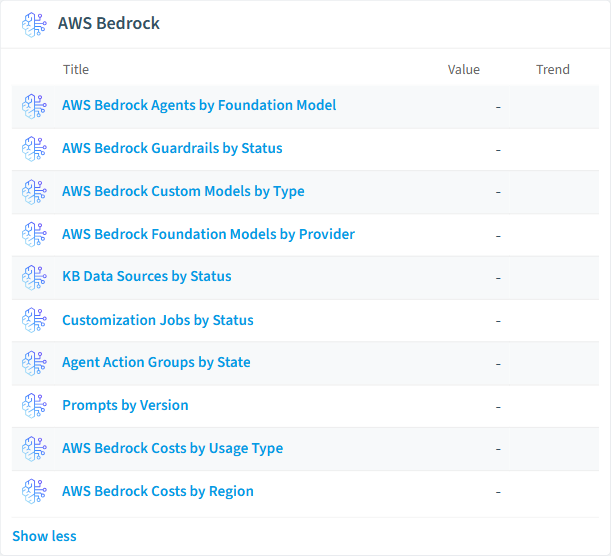
  • AWS Bedrock Agents by Foundation Model

    Shows the number of agents grouped by foundation model

    Bar Chart · Adoption

  • AWS Bedrock Guardrails by Status

    Shows the distribution of guardrails by their current status

    Donut Chart · Security

  • AWS Bedrock Custom Models by Type

    Shows the number of custom models grouped by customization type

    Bar Chart · Adoption

  • AWS Bedrock Foundation Models by Provider

    Shows the number of foundation models grouped by provider

    Donut Chart · Adoption

  • KB Data Sources by Status

    Shows the distribution of knowledge base data sources by status

    Donut Chart · Operation

  • Customization Jobs by Status

    Shows the distribution of model customization jobs by status

    Donut Chart · Operation

AWS Bedrock reports card in Rencore

Automations

1 automated remediation workflows.

  • Delete AWS Bedrock Agent

    Automatically deletes an AWS Bedrock agent after approval

Segments

16 data groupings for targeted filtering.

  • Active AWS Bedrock Agents

    Shows agents with status 'PREPARED'

  • Failed AWS Bedrock Agents

    Shows agents with status 'FAILED'

  • Active AWS Bedrock Guardrails

    Shows guardrails with status 'READY'

  • Active Provisioned Throughputs

    Shows provisioned throughputs with status 'InService'

  • Failed AWS Bedrock Flows

    Shows flows with status 'Failed'

  • Failed AWS Bedrock Knowledge Bases

    Shows knowledge bases with status 'FAILED'

  • Active KB Data Sources

    Shows knowledge base data sources with status 'AVAILABLE'

  • Failed Customization Jobs

    Shows model customization jobs with status 'Failed'

  • Disabled Agent Action Groups

    Shows agent action groups with state 'DISABLED'

  • Agent Knowledge Base Associations

    Shows all agent-to-knowledge-base associations

  • IAM Users without MFA

    Shows IAM users that do not have MFA enabled

  • IAM Users with Console Access

    Shows IAM users that have console login enabled

  • Bedrock IAM Roles

    Shows all IAM roles with Bedrock-related permissions

  • Recent Bedrock API Activity

    Shows recent Bedrock API activity from CloudTrail

  • High-Cost Days

    Cost entries exceeding $100

  • Provisioned Throughput Costs

    Cost entries for provisioned throughput capacity

Provisioning Templates

4 resource creation templates.

  • Create AWS Bedrock Agent with approval

    Request a new AWS Bedrock agent with approval of your manager

  • Create AWS Bedrock Knowledge Base with approval

    Request a new AWS Bedrock knowledge base with approval of your manager

  • Create AWS Bedrock Guardrail with approval

    Request a new AWS Bedrock guardrail with approval of your manager

  • Create AWS Bedrock Prompt with approval

    Request a new AWS Bedrock prompt template with approval of your manager

Frequently asked questions

Does Rencore support governance for AI tools beyond Microsoft Copilot?
Yes. Rencore connects to Claude, OpenAI, Gemini, GitHub Copilot, Cursor, Windsurf, AWS Bedrock, Azure AI Foundry, and other AI platforms. Each connector provides tailored policies for cost management, security, adoption tracking, and access control, giving IT a unified governance view across all AI tools the organization uses.
What is Rencore governance?
Rencore governance is a SaaS platform that continuously monitors your Microsoft 365 tenant for policy violations, configuration drift, and security risks across SharePoint, Teams, Power Platform, Copilot, and AI Agents. It automates compliance evidence collection, surfaces oversharing and sprawl, and provides actionable remediation workflows, reducing manual audit effort by up to 80%.
How do Rencore policies work?
Rencore ships with hundreds of pre-built policies that detect governance violations across every connector, oversharing, sprawl, cost overruns, security risks, and compliance gaps. Policies run on a continuous schedule, evaluate each discovered object against configurable rules, and flag violations with severity (High, Medium, Low), category, and a recommended action.

Trusted by

MAPALBAMVille de LuxembourgWACKERGRUNDFOSAMGENOsramLufthansaHoneywellThyssenKruppSunrisePattern

See Rencore in your tenant

Connect your environment in minutes and surface the governance findings that matter on day one.







