
Teams
Rencore monitors Microsoft Teams across 22 governance policies, 7 reports, and 11 segments, detecting team sprawl, guest access risks, and inactive workspaces automatically.
Rencore Teams governance is a set of 22 policies, 7 reports, and 11 segments that continuously audit Microsoft Teams for sprawl, guest access violations, inactive teams, and naming standard drift. It identifies teams with external guests who have owner-level access, teams without recent activity that still consume resources, and naming convention violations, then routes each finding to the right owner for resolution.
74 governance capabilities: 9 inventories · 22 policies · 7 reports · 11 segments · 5 automations · 8 provisioning templates
Why govern Teams with Rencore
-
Control team sprawl
Detect inactive teams (90+ days without posts or meetings), duplicate team names, and teams without owners. Prioritize cleanup by team age, member count, and storage consumed.
-
Manage guest access risks
Find teams where external guests have owner-level permissions, teams with excessive guest counts, or guests whose invitations have expired but access persists.
-
Enforce naming and creation standards
Flag teams that violate naming conventions, teams created without required metadata, and teams missing classification labels required by compliance policies.
-
Track adoption and usage
Reports show activity trends per team, most active channels, app usage distribution, and storage consumption, helping IT right-size their Teams environment.
What Rencore discovers
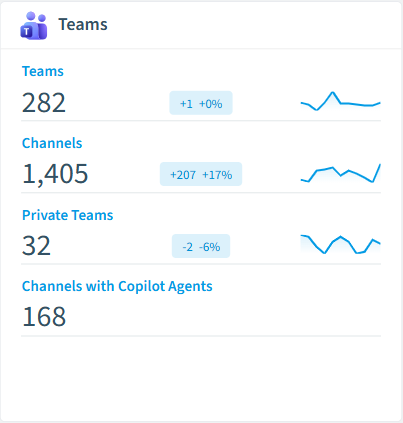
Rencore automatically inventories these Teams object types.
-
Team
All teams in your tenant
-
Channel
All Channels of the Team
-
Tab
All tabs of your teams in your tenant
-
App
All installed Teams apps in your tenant
-
Deleted Team
All teams that have been deleted
-
Usage
Details about Teams usage in the last 180 days
How Teams governance works in Rencore
Rencore connects to Microsoft Teams via Microsoft Graph API and inventories every team, channel, and guest membership across the tenant. Policies evaluate each object against configurable governance rules and flag violations with severity, category, and recommended action.
Who uses Teams governance
M365 product owners use Teams governance to prevent workspace sprawl and enforce creation standards. IT administrators monitor guest access patterns and inactive teams to reduce security exposure. Heads of IT use the reports to justify governance investments with concrete sprawl and adoption data.
Getting started
Connect your Microsoft 365 tenant, and Teams policies activate within the first scan. Rencore uses read-only Microsoft Graph permissions, no Teams app installation or bot registration required. All 22 policies run automatically on every scan cycle.
Policies
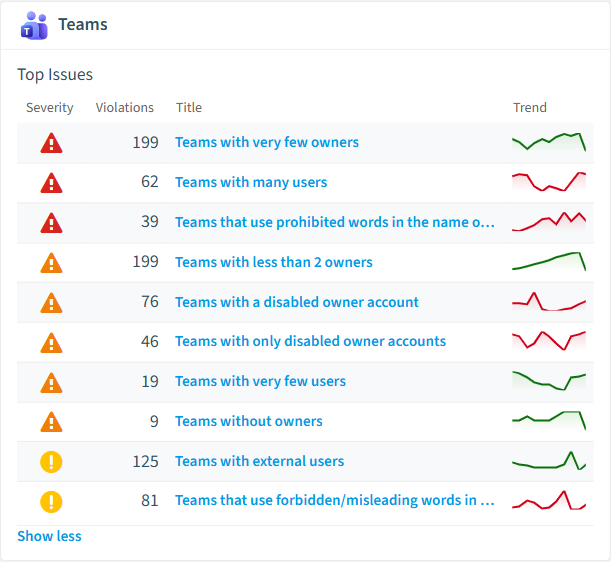
22 governance rules that detect violations and risks.
-
Teams with very few owners
Shows Teams which have 1 or no owner
High Operation -
Teams with many users
Shows Teams with a number of users that exceeds a threshold (default 50 users)
High Operation -
Teams that use prohibited words in the name or description
Shows teams that use a list of prohibited words in the name or description
High Operation -
Team contains Copilot agent and external members
Detects Team where a Copilot agent is installed and external users are present, posing security concerns.
High Security -
Teams with a disabled owner account
Shows Teams that have at least one disabled owner account
Medium User Offboarding -
Teams with very few users
Shows Teams which has 1 or 2 users
Medium Sprawl
Need a rule that isn't listed? Rencore's Policy Builder lets you create custom policies tailored to your organization. Learn more about the Policy Builder
Reports
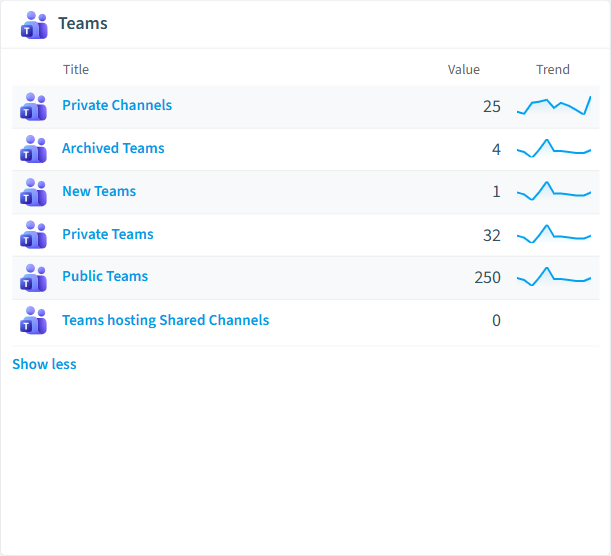
7 analytics views and dashboards.
-
Archived Teams
All Teams that have been archived
List · Uncategorized
-
New Teams
All Teams scanned the first time in the last 14 days
List · Uncategorized
-
Private Teams
All Teams that are marked as private
List · Uncategorized
-
Public Teams
All teams that are visible to everyone in the organization
List · Uncategorized
-
Private Channels
All private channels in Teams
List · Uncategorized
-
Teams Pre-Scan
Regular scans for a large amount of Teams may require dedicated database in Rencore Governance
Donut Chart · Operation
Automations
5 automated remediation workflows.
-
Set teams to private by default
Sets public teams to private and informs teams owners about the change
-
Mark teams with external users
Add External indicator to team title if a team contains external users.
-
Archive unused teams
Automatically archives unused MS Teams teams
-
Send one email per Team owner
Send an email to every owner of one Microsoft Teams team and directly addresses the user by first and last name
-
Send a combined email to all owners of a Team
Send a single (combined) email to the owners of one Microsoft Teams team
Segments
11 data groupings for targeted filtering.
-
Archived Teams
All Teams that have been archived
-
New Teams
All Teams scanned the first time in the last 14 days
-
Private Teams
All Teams that are marked as private
-
Public Teams
All teams that are visible to everyone in the organization
-
Private Channels
All private channels in Teams
-
Shared Channels
Shows channels that are shared
-
Store Apps
Shows the apps available to all tenants through the Microsoft Teams app store
-
Organization apps
Shows the (custom developed) apps available only in this tenant
-
Agents published to Teams app catalog
Shows all Copilot agents and SharePoint agents which are
-
Teams with Agents
Identifies Teams which had a Copilot agent conversation in the last 90 days
-
Channels with Copilot Agents
Identifies Team channels with a Copilot Agent conversation in the last 90 days
Provisioning Templates
8 resource creation templates.
-
Custom Team
Start with an empty Team and configure policies, channels and apps from scratch
-
Manage a Project
Manage tasks, share documents, conduct project meetings and document risks and decisions with this template for general project management.
-
Department Workspace
Manage communication inside a department with a team for chat based communication and a SharePoint site for document collaboration.
-
Manage an Event
Manage tasks, documents, and collaborate on everything you need to deliver a compelling event. Invite guest users to have a secure collaboration inside and outside of your company.
-
Onboard Employees
Improve your culture and streamline your employee onboarding with this central team for resources, questions, and a bit of fun.
-
Product Development Workspace
Work together in product development, organize tasks, meeting notes and documents.
-
Organize Help Desk
Collaborate on documentation, policy, and processes that support your help desk. Integrate your existing ticketing system or use our template to manage requests.
-
Private Team
Use this template for internal collaboration with your colleagues, to discuss topics, share ideas and documents.
Frequently asked questions
What is Teams governance?
Can Rencore govern Microsoft Teams?
What is Rencore governance?
Trusted by







