
SharePoint
Rencore monitors SharePoint Online across 32 governance policies, 11 reports, and 10 segments, detecting oversharing, site sprawl, and storage risks automatically.
Rencore SharePoint governance is a set of 32 policies, 11 reports, and 10 segments that continuously audit SharePoint Online for oversharing risks, site sprawl, and storage mismanagement. It detects anonymous sharing links, sites with external access beyond policy, orphaned site collections without active owners, and storage-heavy sites approaching tenant limits, then provides approval-based automations to remediate each finding.
See SharePoint in Rencore
Every SharePoint object Rencore discovers and inventories across your tenant.
The governance policies Rencore evaluates against SharePoint, with severity and category.
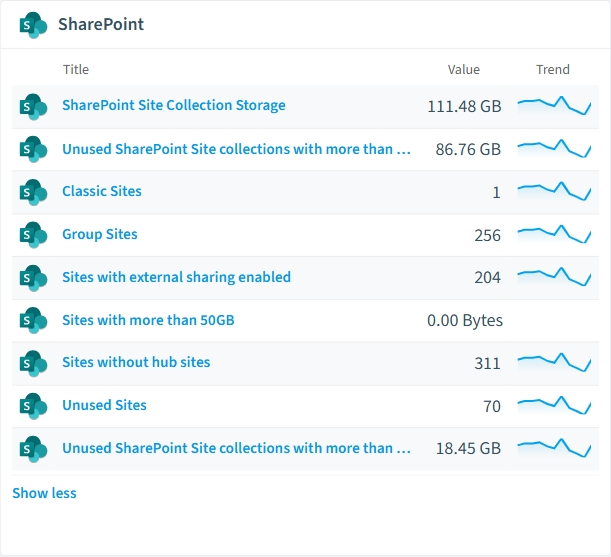
Built-in SharePoint reports and analytics views in Rencore.
The SharePoint governance dashboard, summarizing risks and status at a glance.
Why govern SharePoint with Rencore
Prevent data oversharing
Detect anonymous sharing links, sites shared with external domains outside your allow-list, and documents accessible to "Everyone except external users." Prioritize by sensitivity label and content age.
Eliminate site sprawl
Find orphaned site collections without active owners, inactive sites (no edits in 90+ days), and sites created outside approved provisioning processes. Automate cleanup with approval workflows.
Control storage costs
Monitor sites approaching their storage quota, identify the largest document libraries, and track version history bloat. Reports show storage trends and forecast when the tenant limit will be reached.
Prepare for Copilot rollout
SharePoint content is the primary data source for Microsoft 365 Copilot. Oversharing violations become Copilot oversharing risks. Fix permissions before Copilot surfaces sensitive documents in AI responses.
What Rencore discovers
Rencore automatically inventories these SharePoint object types.
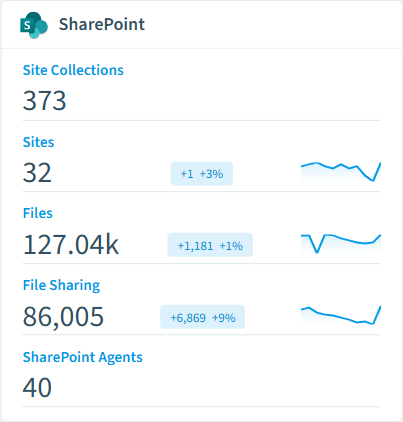
How SharePoint governance works in Rencore
Rencore connects to SharePoint Online via Microsoft Graph and SharePoint REST APIs, inventorying every site collection, document library, sharing link, and permission set in the tenant. Policies run continuously and compare each object against governance rules defined by your organization.
The Copilot connection
SharePoint is the data layer for Microsoft 365 Copilot. Every oversharing violation, an anonymous link, a site shared with “Everyone”, becomes a potential Copilot data leak. Rencore’s SharePoint policies give you Copilot data readiness by default: fix sharing violations, and Copilot answers become safer.
Who uses SharePoint governance
M365 product owners use it to maintain a clean, well-governed tenant. CISOs rely on the oversharing policies to meet data protection requirements. IT administrators use the reports to plan storage procurement and justify site lifecycle policies with data.
Getting started
Connect your Microsoft 365 tenant. SharePoint policies activate on first scan, no per-site configuration needed. Rencore reads data through Microsoft Graph with delegated or application permissions and scans every site collection automatically.
Policies
32 governance rules that detect violations and risks.
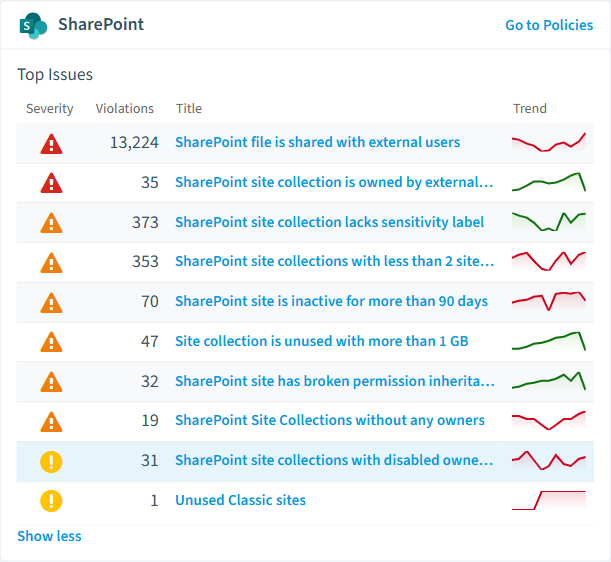
Need a rule that isn't listed? Rencore's Policy Builder lets you create custom policies tailored to your organization.
Reports
11 analytics views and dashboards.
Automations
4 automated remediation workflows.
Segments
10 data groupings for targeted filtering.
Provisioning templates
3 resource creation templates.
Frequently asked questions
What is SharePoint governance?
How many SharePoint governance policies does Rencore offer?
What is Rencore governance?
Related guides
- How to govern SharePoint
- How to detect and fix SharePoint oversharing
- How to control Microsoft Teams sprawl
- How to produce DORA audit evidence in Microsoft 365
- How to monitor data loss prevention across Microsoft 365
- How to prepare for NIS2 in Microsoft 365
- How to prepare Microsoft 365 for a Copilot rollout
- How to run recurring access reviews across Microsoft 365 and AI tools
- How does tenant sprawl in Microsoft 365 impact governance efficiency?
Trusted by










