
Power BI
Rencore monitors Power BI across 10 governance policies, 5 reports, and 12 inventories, detecting workspace sprawl, overshared datasets, and stale content automatically.
Rencore Power BI governance is a set of 10 policies, 5 reports, 3 segments, and 12 inventories that continuously audit Power BI workspaces, datasets, reports, and sharing configurations. It detects workspaces shared beyond their intended audience, datasets with row-level security gaps, stale reports without recent views, and content published outside approved workspaces.
See Power BI in Rencore
Every Power BI object Rencore discovers and inventories across your tenant.
The governance policies Rencore evaluates against Power BI, with severity and category.
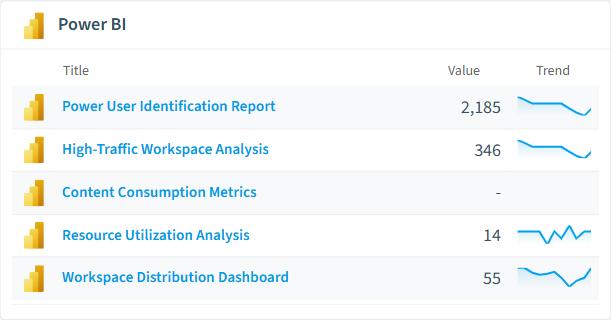
Built-in Power BI reports and analytics views in Rencore.
The Power BI governance dashboard, summarizing risks and status at a glance.
Why govern Power BI with Rencore
Control workspace sprawl
Detect workspaces without assigned admins, workspaces with no recent activity, and content published outside approved workspace structures. Prioritize cleanup by age and usage.
Secure dataset sharing
Identify datasets shared with external users, reports accessible to broader audiences than intended, and workspaces where sharing settings bypass organizational policies.
Manage content lifecycle
Find stale reports without views in 90+ days, datasets with broken data source connections, and dashboards that no longer reflect current business requirements. Reports show content usage trends.
What Rencore discovers
Rencore automatically inventories these Power BI object types.
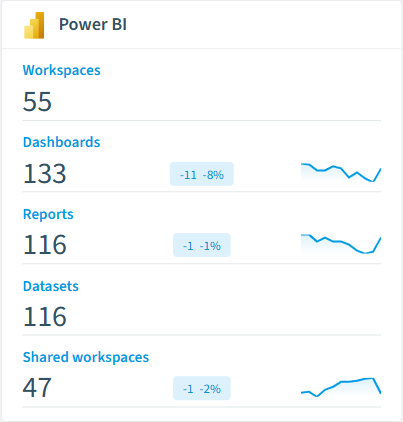
How Power BI governance works in Rencore
Rencore connects to Power BI via the Power BI REST API and inventories workspaces, datasets, reports, dashboards, dataflows, and sharing configurations. Policies run on every scan cycle and flag sprawl, sharing, and lifecycle issues with severity levels.
Who uses Power BI governance
M365 product owners use it to maintain clean workspace governance alongside their broader M365 posture. IT administrators track workspace sprawl and manage content lifecycle. CISOs review dataset sharing policies to ensure sensitive business data stays within approved boundaries.
Getting started
Connect your Microsoft 365 tenant. Power BI policies activate on first scan alongside your existing M365 governance. No per-workspace configuration needed.
Policies
10 governance rules that detect violations and risks.
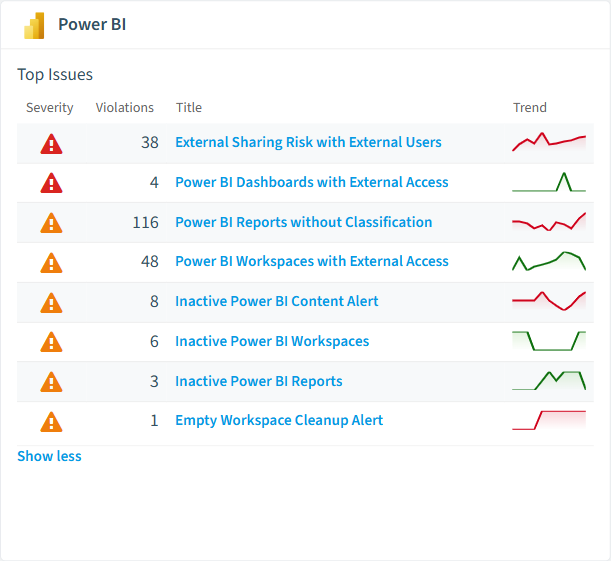
Need a rule that isn't listed? Rencore's Policy Builder lets you create custom policies tailored to your organization.
Reports
5 analytics views and dashboards.
Segments
3 data groupings for targeted filtering.
Provisioning templates
2 resource creation templates.
Frequently asked questions
What governance areas does Rencore cover?
What is Rencore governance?
How do Rencore policies work?
Related guides
Trusted by










