
Connectors · Microsoft

Power Automate

Rencore monitors Power Automate across 13 governance policies, 5 reports, and 6 inventories, detecting flow sprawl, DLP violations, and inactive automations automatically.

Digital Workplace Code
Published For M365 Product Owner, IT Admin, CISO

Rencore Power Automate governance is a set of 13 policies, 5 reports, 4 segments, and 6 inventories that continuously audit Power Automate flows, connectors, and environments for sprawl, DLP compliance gaps, and operational risks. It detects flows using blocked connectors, flows without assigned owners, inactive automations consuming API capacity, and flows with excessive error rates.

36 governance capabilities: 6 inventories · 13 policies · 5 reports · 4 segments · 2 automations · 1 provisioning templates

Why govern Power Automate with Rencore

  • Control flow sprawl

    Detect inactive flows without executions in 90+ days, flows without assigned owners, and flows created outside approved environments. Automate cleanup with approval workflows.

  • Enforce DLP and connector policies

    Identify flows using connectors that violate DLP policies, flows connecting to external APIs outside the approved list, and flows with premium connectors assigned to users without proper licensing.

  • Monitor flow health

    Find flows with excessive error rates, flows consuming disproportionate API capacity, and automations that run successfully but process no data. Reports show execution trends and connector usage.

What Rencore discovers

Rencore automatically inventories these Power Automate object types.
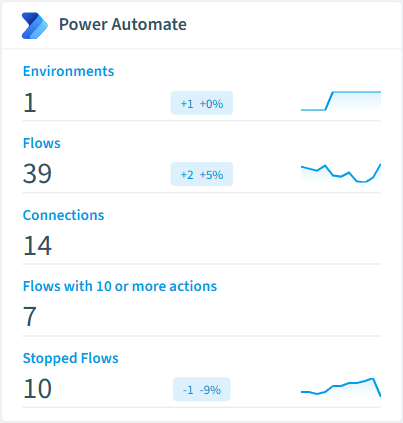
  • Environment

    All Power Automate environments in your tenant

  • Flow

    All Power Automate Flows in your tenant

  • Trigger

    All Flow triggers used by your Flows

  • Action

    All Flow Actions used by your Flows

  • Connection

    All Flow connections used by your Flows

  • Run

    All Flow Runs of your Flows

Power Automate inventory card in Rencore

How Power Automate governance works in Rencore

Rencore connects to Power Automate via the Power Platform API and inventories flows, connectors, environments, and execution history. Policies run on every scan cycle and flag sprawl, DLP compliance, and operational issues with severity levels and recommended actions.

Who uses Power Automate governance

M365 product owners use it to maintain a clean automation environment alongside their Teams and SharePoint governance. IT administrators track flow health and enforce connector policies. CISOs review DLP compliance to ensure flows don’t bypass data protection controls.

Getting started

Connect your Microsoft 365 tenant. Power Automate policies activate on first scan alongside your existing M365 governance. No per-environment configuration needed.

Policies

13 governance rules that detect violations and risks.
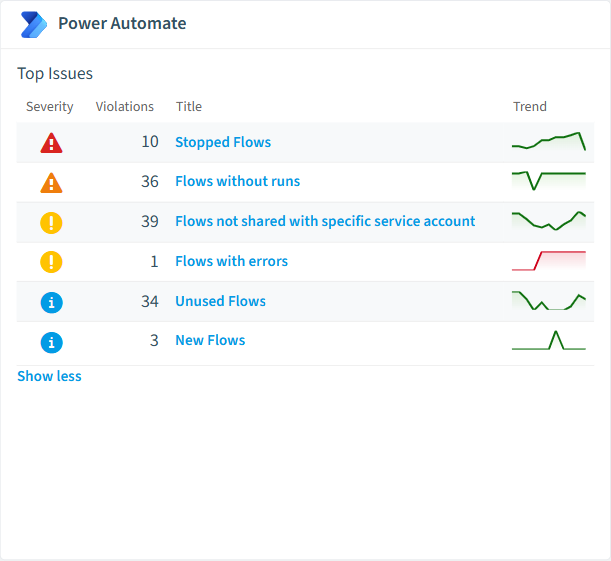
Power Automate policies card in Rencore
  • Long running Flows

    Shows Flows that ran for a longer period (default 3 hours)

    High Operation
  • Stopped Flows

    Shows Flows that have stopped

    High Sprawl
  • Flows requiring a premium license

    Shows Flows with premium connectors, premium actions or premium triggers (e.g. common data service)

    High Costs
  • Stopped Flows Last Week with errors

    Shows Flows that have stopped

    High Sprawl
  • Flows without runs

    Shows Flows that have never been used. Warning: Flows with runs that happened before the first flow scan of Rencore Governance occurred will not be found.

    Medium Sprawl
  • Flows not shared with specific service account

    Shows all Flows that are not shared with a specified service account (adjust account in Policy)

    Low Operation

Need a rule that isn't listed? Rencore's Policy Builder lets you create custom policies tailored to your organization. Learn more about the Policy Builder

Reports

5 analytics views and dashboards.
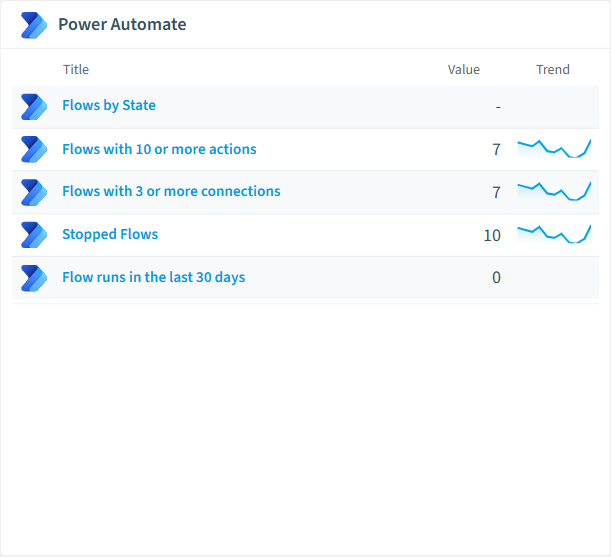
  • Flows by State

    Shows count of Flows grouped by started or stopped state

    Pie Chart · Operation

  • Flows with 10 or more actions

    All complex flows

    List · Uncategorized

  • Flows with 3 or more connections

    All Flows that user combine many services

    List · Uncategorized

  • Stopped Flows

    All stopped Flows

    List · Uncategorized

  • Flow runs in the last 30 days

    All Flow runs that occurred in the last 30 days

    List · Uncategorized

Power Automate reports card in Rencore

Automations

2 automated remediation workflows.

  • Send a combined email to all owners of a Flow

    Send a single (combined) email to the owners of one Microsoft Power Automate Flow

  • Send one email per Flow owner

    Send an email to every owner of one Microsoft Power Automate Flow and directly addresses the user by first and last name

Segments

4 data groupings for targeted filtering.

  • Flows with 10 or more actions

    All complex flows

  • Flows with 3 or more connections

    All Flows that user combine many services

  • Stopped Flows

    All stopped Flows

  • Flow runs in the last 30 days

    All Flow runs that occurred in the last 30 days

Provisioning Templates

1 resource creation templates.

  • Request Power Platform Environment

    Submit a service request for the creation of a Power Platform environment through a standardised approval process

Frequently asked questions

What governance areas does Rencore cover?
Rencore covers six governance pillars: visibility and inventory across all Microsoft 365 services, ready-to-go policies with over 100 pre-built governance checks, compliance and audit evidence collection for regulatory requirements, extensibility and customization through custom policies and automations, cross-department collaboration with shared dashboards and role-based access, and AI and Copilot readiness to prepare tenants for secure AI adoption.
What is Rencore governance?
Rencore governance is a SaaS platform that continuously monitors your Microsoft 365 tenant for policy violations, configuration drift, and security risks across SharePoint, Teams, Power Platform, Copilot, and AI Agents. It automates compliance evidence collection, surfaces oversharing and sprawl, and provides actionable remediation workflows, reducing manual audit effort by up to 80%.
How do Rencore policies work?
Rencore ships with hundreds of pre-built policies that detect governance violations across every connector, oversharing, sprawl, cost overruns, security risks, and compliance gaps. Policies run on a continuous schedule, evaluate each discovered object against configurable rules, and flag violations with severity (High, Medium, Low), category, and a recommended action.

Trusted by

MAPALBAMVille de LuxembourgWACKERGRUNDFOSAMGENOsramLufthansaHoneywellThyssenKruppSunrisePattern

See Rencore in your tenant

Connect your environment in minutes and surface the governance findings that matter on day one.







