
Connectors · Microsoft

Planner

Rencore monitors Microsoft Planner across 27 governance policies, 11 reports, and 3 inventories (plans, tasks, buckets), detecting plan sprawl, overdue task burden, unassigned work, and creator-deleted plans automatically.

Digital Workplace
Last reviewed For M365 Product Owner, IT Admin

Rencore Planner governance is a set of 27 policies, 11 reports, 17 segments, and 3 inventories that audit Microsoft Planner across plans, tasks, and buckets. It detects plans with no activity in 6 or 12 months, plans shared beyond the owning group, plans near the bucket or task limit, urgent overdue or unassigned tasks, and tasks whose creator has been deleted, helping IT keep Planner usage healthy and visible alongside Teams and Groups governance.

60 governance capabilities: 3 inventories · 27 policies · 11 reports · 17 segments · 1 automations · 1 provisioning templates

Why govern Planner with Rencore

  • Control plan sprawl

    Detect Planner plans with no activity in 6 or 12 months, empty plans, plans with placeholder titles, plans whose creator has been deleted, and plans shared beyond the owning group. Archive abandoned plans with confidence.

  • Surface overdue and unassigned work

    Flag urgent overdue tasks, urgent tasks with no assignee, tasks more than 7 or 30 days overdue, open tasks with no due date, and tasks stalled in progress for 6 months. Give team leads a real-time view of execution risk.

  • Keep plans within platform limits

    Track plans approaching the bucket and task limits, oversized buckets, plans not using buckets, and tasks near checklist or references limits. Prevent users from hitting Planner ceilings that block productivity.

  • Standardize new plans

    Provisioning templates enforce consistent plan structures, naming conventions, and bucket configurations when new plans are created through Rencore's provisioning workflows.

What Rencore discovers

Rencore automatically inventories these Planner object types.
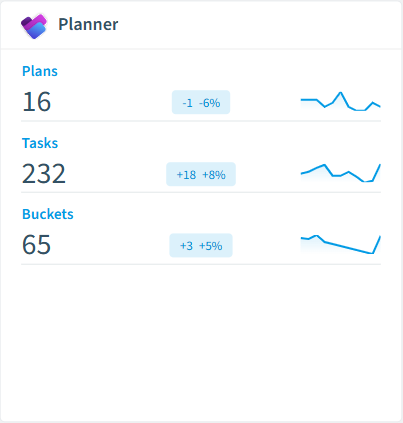
  • Plan

    All Planner plans

  • Task

    All Planner tasks

  • Bucket

    All Planner buckets

Planner inventory card in Rencore

How Planner governance works in Rencore

Rencore connects to Microsoft Planner via the Microsoft Graph API and inventories three object types (plans, tasks, and buckets) across the tenant. The 27 policies run on every scan cycle, evaluating each plan, task, and bucket against sprawl, execution, and structural rules with severity levels.

Who uses Planner governance

M365 product owners use plan-sprawl and bucket-limit policies to keep Planner usage healthy at tenant scale. IT administrators rely on the 17 reusable segments (active plans, stale plans, externally shared plans, urgent overdue tasks) to drive cleanup and notification campaigns. Team leads use the 11 reports (assignment load by user, overdue task trend, tasks by status and priority) to spot execution risk before it surfaces in management reviews.

Getting started

Connect your Microsoft 365 tenant. All 27 Planner policies activate on first scan alongside your existing M365 governance, with no additional configuration required. One provisioning template enforces consistent plan structures when teams request new plans through Rencore.

Policies

27 governance rules that detect violations and risks.
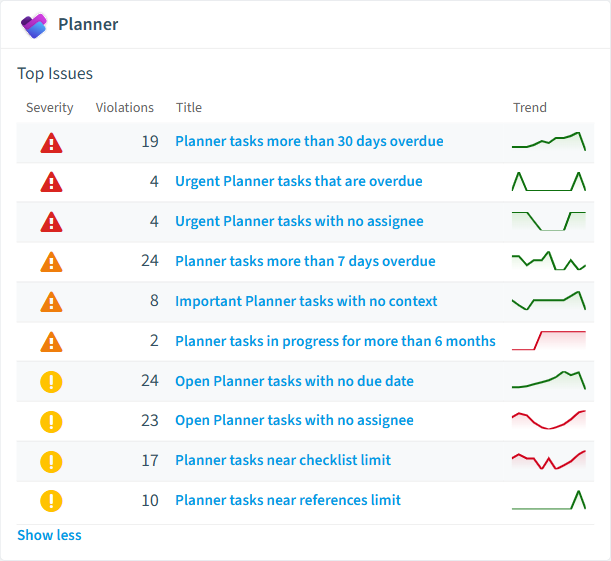
Planner policies card in Rencore
  • Planner plans whose creator has been deleted

    Plans where the original creator's account no longer exists in Entra ID. Ownership review needed.

    High Security
  • Planner tasks more than 30 days overdue

    Open tasks whose due date is more than 30 days in the past.

    High Operation
  • Urgent Planner tasks that are overdue

    Tasks with urgent priority whose due date has passed and are not yet completed.

    High Operation
  • Urgent Planner tasks with no assignee

    Tasks marked urgent that are not assigned to anyone.

    High Security
  • Planner plans with no activity in the last year

    Plans whose tasks and completions have all been idle for more than 365 days. Candidates for archival or deletion.

    Medium Sprawl
  • Planner plans shared beyond the owning group

    Plans whose details.sharedWith list contains users outside the Microsoft 365 group's standard membership.

    Medium Security

Need a rule that isn't listed? Rencore's Policy Builder lets you create custom policies tailored to your organization. Learn more about the Policy Builder

Reports

11 analytics views and dashboards.
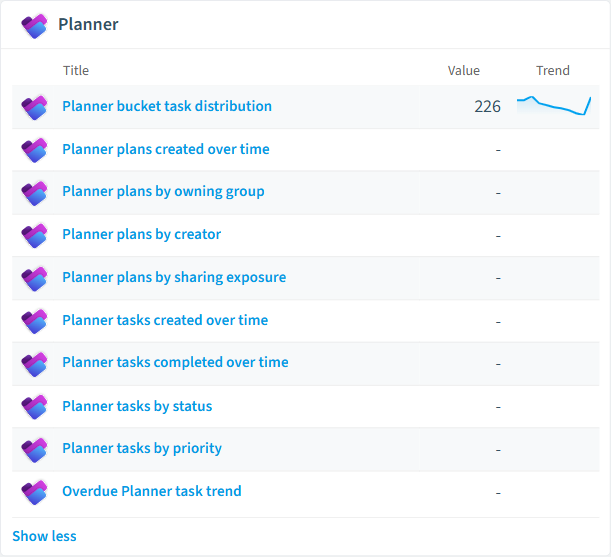
  • Planner plans created over time

    Number of plans created per month over the last year.

    Bar Chart · Adoption

  • Planner plans by owning group

    Top 20 Microsoft 365 groups ranked by number of Planner plans.

    Bar Chart · Operation

  • Planner plans by creator

    Top 20 users ranked by number of Planner plans they created.

    Bar Chart · Adoption

  • Planner plans by sharing exposure

    Plans grouped by the number of users in their sharedWith list.

    Bar Chart · Security

  • Planner tasks created over time

    Number of tasks created per month over the last year.

    Bar Chart · Adoption

  • Planner tasks completed over time

    Number of tasks completed per month over the last year.

    Bar Chart · Adoption

Planner reports card in Rencore

Automations

1 automated remediation workflows.

  • Planner Board

    Template for a private Planner Plan

Segments

17 data groupings for targeted filtering.

  • Active Planner plans

    Plans with activity in the last 90 days.

  • Stale Planner plans

    Plans with no activity in the last 90 days.

  • Abandoned Planner plans

    Plans with no activity in over a year.

  • Empty Planner plans

    Plans containing no tasks.

  • Planner plans with overdue work

    Plans that contain at least one overdue task.

  • Externally shared Planner plans

    Plans whose sharedWith list is non-empty.

  • Planner plans ready to archive

    Plans where every task is completed and there has been no activity for over a year.

  • Recently created Planner plans

    Plans created in the last 30 days.

  • Overdue Planner tasks

    Open tasks whose due date is in the past.

  • Unassigned open Planner tasks

    Open tasks with no assignee.

  • Urgent open Planner tasks

    Tasks with urgent priority that are not yet completed.

  • Stalled Planner tasks

    Tasks in progress for more than 90 days.

  • Recently completed Planner tasks

    Tasks completed in the last 30 days.

  • Open Planner tasks with no due date

    Open tasks with no due date set.

  • Planner tasks with no context

    Tasks with no description, checklist or references.

  • Oversized Planner buckets

    Buckets with more than 50 tasks.

  • Empty Planner buckets

    Buckets containing no tasks.

Provisioning Templates

1 resource creation templates.

  • Planner Board

    Template for a private Planner Plan

Frequently asked questions

What governance areas does Rencore cover?
Rencore covers six governance pillars: visibility and inventory across all Microsoft 365 services, ready-to-go policies with over 100 pre-built governance checks, compliance and audit evidence collection for regulatory requirements, extensibility and customization through custom policies and automations, cross-department collaboration with shared dashboards and role-based access, and AI and Copilot readiness to prepare tenants for secure AI adoption.
What is Rencore governance?
Rencore governance is a SaaS platform that continuously monitors your Microsoft 365 tenant for policy violations, configuration drift, and security risks across SharePoint, Teams, Power Platform, Copilot, and AI Agents. It automates compliance evidence collection, surfaces oversharing and sprawl, and provides actionable remediation workflows, reducing manual audit effort by up to 80%.
How do Rencore policies work?
Rencore ships with hundreds of pre-built policies that detect governance violations across every connector, oversharing, sprawl, cost overruns, security risks, and compliance gaps. Policies run on a continuous schedule, evaluate each discovered object against configurable rules, and flag violations with severity (High, Medium, Low), category, and a recommended action.

Trusted by

MAPALBAMVille de LuxembourgWACKERGRUNDFOSAMGENOsramLufthansaHoneywellThyssenKruppSunrisePattern

See Rencore in your tenant

Connect your environment in minutes and surface the governance findings that matter on day one.







