
Microsoft Agent 365

Rencore monitors Microsoft Agent 365 across 37 governance policies, 5 reports, and 12 inventories, detecting shadow AI agents, over-published agents, ownerless blueprints, and stale agent identities automatically.

Published For M365 Product Owner, Head of IT, CISO
AI & Agents
Definition

Rencore Microsoft Agent 365 governance is a set of 37 policies, 5 reports, and 12 inventories that continuously audit Microsoft Agent 365 for shadow AI agents, over-published agents, ownerless blueprints, and risky agent identities. It detects agents deployed tenant-wide without a publisher, blocked agents that are still active, Microsoft-disabled identities that remain enabled, and blueprint credentials expiring within 30 days.

See Microsoft Agent 365 in Rencore

Step 1 of 3

81 governance capabilities: 12 inventories · 37 policies · 5 reports · 16 segments · 11 automations

Why govern Microsoft Agent 365 with Rencore

Inventory agents and catch shadow AI

Discover agents, agent blueprints, and agent identities across the tenant. Flag shadow AI agents detected on managed devices, agentic AI CLIs, and agents missing a publisher.

Control agent publishing and reach

Detect external-publisher agents available to all users, custom agents deployed tenant-wide, blocked agents that are still deployed, and multitenant blueprints without a verified publisher.

Govern agent identities and ownership

Find blueprints and identities with no owners or sponsors, Microsoft-disabled identities still enabled, agent users that are guests, and identities tied to a deactivated owner or sponsor.

Manage agent credentials and lifecycle

Flag blueprint credentials expiring within 30 days, blueprints using password credentials, and unused blueprints so agent access stays current and accountable.

What Rencore discovers

Rencore automatically inventories these Microsoft Agent 365 object types.
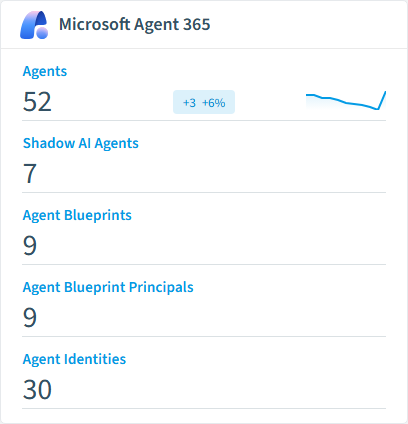
Agent
Agents and apps registered in the tenant agent registry (Microsoft 365 admin center > Agents > All agents). Each package may contain one or more elements (declarative agent, custom-engine agent, bot, Office add-in).
Agent Element
Individual elements (declarative agents, custom engine agents, bots, add-ins) contained within a agent package.
Agent Capability
Reusable capability (e.g. WebSearch, CodeInterpreter, GraphConnectors). Its relations list every agent that can use it.
Agent Knowledge Source
Reusable knowledge source an agent reads from (e.g. a SharePoint site or Graph connector). Its relations list every agent that reads from it.
Agent Action
Reusable action an agent can perform against an external system (e.g. sendEmail, createTask). Its relations list every agent that can perform it.
Shadow AI Agent
Unmanaged local AI tools and agents (chatbots, coding assistants, local models, agentic CLIs) detected on Intune-managed devices that were not approved by IT.
Microsoft Agent 365 inventory card in Rencore

How Microsoft Agent 365 governance works in Rencore

Rencore connects to Microsoft Agent 365 and inventories agents, agent blueprints, agent identities, capabilities, knowledge sources, actions, and agent users. It also detects shadow AI agents on managed devices. Policies evaluate each object on every scan cycle and flag violations with severity and a recommended action.

The agent governance challenge

Agents act with their own identities, credentials, and permissions, and a single tenant-wide deployment can reach every user. Without inventory and ownership controls, blocked agents stay live, blueprints lose their owners, and shadow AI spreads on managed devices. Rencore brings Microsoft Agent 365 into the same governance dashboard as the rest of your Microsoft 365 estate.

Who uses Microsoft Agent 365 governance

M365 product owners use it to keep the agent inventory clean and publishers accountable. Heads of IT track blueprint ownership and credential expiry. CISOs rely on the shadow AI and identity policies to limit unmanaged agent risk.

Getting started

Connect your Microsoft 365 tenant. All 37 policies activate on the first scan, covering agents, blueprints, identities, and shadow AI detection. Reports and segments populate as soon as the first inventory completes.

Policies

37 governance rules that detect violations and risks.
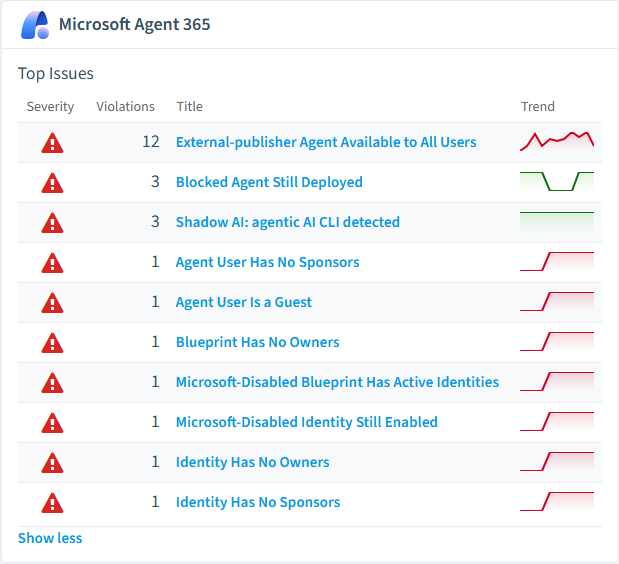
Microsoft Agent 365 policies card in Rencore
Blocked Agent Still Deployed
Flags agents that are blocked in the agent registry but still appear deployed to users, indicating that the block is not being enforced.
High Security
External-publisher Agent Available to All Users
Identifies external-publisher agents that every user in the tenant can find and install, which is a common oversharing pattern after a broad initial enablement.
High External Access
Shadow AI: agentic AI CLI detected
Flags unapproved local agentic AI CLIs and coding agents on managed devices - the highest-risk shadow AI class.
High Security
Microsoft-Disabled Blueprint Has Active Identities
Flags blueprints disabled by Microsoft that still have linked agent identities.
High Security
Blueprint Has No Owners
Flags agent identity blueprints that have no owners registered in the owners collection.
High Operation
Identity Has No Owners
Flags agent identities that have no owners registered.
High Operation

Need a rule that isn't listed? Rencore's Policy Builder lets you create custom policies tailored to your organization.

Reports

5 analytics views and dashboards.
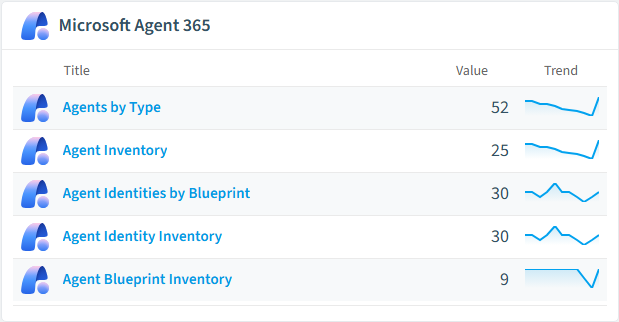
Agents by Type
Breaks down the tenant agent registry by package source type (custom, external, builtin).
Donut Chart · Operation
Agent Inventory
Full inventory of agents and apps in the tenant agent registry.
List · Operation
Agent Identities by Blueprint
Counts agent identities per blueprint, computed by matching agentIdentityBlueprintId to a blueprint's appId.
Bar Chart · Operation
Agent Identity Inventory
Full inventory of Microsoft Entra agent identities.
List · Operation
Agent Blueprint Inventory
Full inventory of Microsoft Entra agent identity blueprints with owner / sponsor / linked-identity counts.
List · Operation
Microsoft Agent 365 reports card in Rencore

Automations

11 automated remediation workflows.

Block shadow AI agent
Creates an Intune device configuration policy to block an unsanctioned AI agent on managed devices.
Notify about shadow AI agent
Sends an email notifying the responsible user or owner that an unsanctioned AI tool was detected.
Disable agent identity
Disables a Microsoft Entra agent identity so it can no longer authenticate.
Notify about orphaned agent identity
Sends an email to an administrator that an agent identity has no registered sponsor and needs one assigned.
Remind about agent credential rotation
Sends an email reminder that an agent identity's or blueprint's credential is expiring soon.
Mark shadow AI agent as approved
Marks a shadow AI agent as sanctioned so it is excluded from the Shadow AI policies.
Delete agent identity
Permanently deletes a Microsoft Entra agent identity via DELETE /servicePrincipals/{id}.
Rename agent identity
Updates the displayName of a Microsoft Entra agent identity via PATCH /servicePrincipals/{id}.
Rename agent blueprint
Updates the displayName of a Microsoft Entra agent identity blueprint via PATCH /applications/{id}.
Delete agent blueprint
Permanently deletes a Microsoft Entra agent identity blueprint via DELETE /applications/{id}. Cascades to its child agent identities.
Disable agent blueprint principal (kill switch)
Sets accountEnabled = false on the agent identity blueprint principal via PATCH /servicePrincipals/{id} - the tenant-wide kill switch for every agent identity created from this blueprint.

Segments

16 data groupings for targeted filtering.

Custom AgentsAgents Deployed Tenant-WideAgents from External PublishersDeclarative AgentsBlocked AgentsMicrosoft-Disabled Blueprints with Active IdentitiesBlueprints without OwnersBlueprints without SponsorsUnused BlueprintsBlueprints Using Password CredentialsBlueprints with Credential Expiring Within 30 DaysIdentities without OwnersIdentities without SponsorsShadow AI: All AgentsShadow AI: Agentic CLIsShadow AI: Local AI

Frequently asked questions

How does Rencore govern AI agents beyond Microsoft Copilot?
Rencore connects to 15+ AI platforms including Claude, OpenAI, Gemini, GitHub Copilot, Cursor, Windsurf, AWS Bedrock, Azure AI Foundry, Glean, and LangDock. Each connector inventories users, workspaces, API keys, and costs with vendor-specific governance policies. Cross-vendor dashboards show total AI spend, access patterns, and policy violations from a single governance console.
What is Rencore governance?
Rencore governance is a SaaS platform that continuously monitors your Microsoft 365 tenant for policy violations, configuration drift, and security risks across SharePoint, Teams, Power Platform, Copilot, and AI Agents. It automates compliance evidence collection, surfaces oversharing and sprawl, and provides actionable remediation workflows, reducing manual audit effort by up to 80%.
Does Rencore support governance for AI tools beyond Microsoft Copilot?
Yes. Rencore connects to Claude, OpenAI, Gemini, GitHub Copilot, Cursor, Windsurf, AWS Bedrock, Azure AI Foundry, and other AI platforms. Each connector provides tailored policies for cost management, security, adoption tracking, and access control, giving IT a unified governance view across all AI tools the organization uses.

Related guides

Trusted by

MAPALBAMVille de LuxembourgWACKERGRUNDFOSAMGENOsramLufthansaThyssenKruppSunrisePattern







