
Microsoft Agent 365

Rencore überwacht Microsoft Agent 365 über 37 Governance-Richtlinien, 5 Berichte und 12 Inventare und erkennt Shadow-AI-Agenten, zu breit veröffentlichte Agenten, herrenlose Blueprints und veraltete Agentenidentitäten automatisch.

Veröffentlicht For M365-Produktverantwortlicher, IT-Leiter, CISO
AI & Agents
Definition

Rencore Microsoft Agent 365 Governance ist ein Satz aus 37 Richtlinien, 5 Berichten und 12 Inventaren, der Microsoft Agent 365 laufend auf Shadow-AI-Agenten, zu breit veröffentlichte Agenten, herrenlose Blueprints und riskante Agentenidentitäten prüft. Sie erkennt mandantenweit ohne Herausgeber bereitgestellte Agenten, blockierte Agenten, die weiterhin aktiv sind, von Microsoft deaktivierte Identitäten, die aktiviert bleiben, und Blueprint-Anmeldedaten, die innerhalb von 30 Tagen ablaufen.

Microsoft Agent 365 in Rencore erleben

Schritt 1 von 3

81 governance capabilities: 12 inventories · 37 policies · 5 reports · 16 segments · 11 automations

Why govern Microsoft Agent 365 with Rencore

Agenten inventarisieren und Shadow AI aufspüren

Erfassen Sie Agenten, Agenten-Blueprints und Agentenidentitäten im gesamten Mandanten. Kennzeichnen Sie Shadow-AI-Agenten, die auf verwalteten Geräten, in agentischen KI-CLIs und bei Agenten ohne Herausgeber erkannt werden.

Veröffentlichung und Reichweite von Agenten kontrollieren

Erkennen Sie Agenten externer Herausgeber, die allen Benutzern zur Verfügung stehen, mandantenweit bereitgestellte benutzerdefinierte Agenten, blockierte Agenten, die weiterhin bereitgestellt sind, und mandantenübergreifende Blueprints ohne verifizierten Herausgeber.

Agentenidentitäten und Eigentümerschaft steuern

Finden Sie Blueprints und Identitäten ohne Eigentümer oder Sponsoren, von Microsoft deaktivierte Identitäten, die aktiviert bleiben, Agentenbenutzer, die Gäste sind, und Identitäten, die an einen deaktivierten Eigentümer oder Sponsor gebunden sind.

Anmeldedaten und Lebenszyklus von Agenten verwalten

Kennzeichnen Sie Blueprint-Anmeldedaten, die innerhalb von 30 Tagen ablaufen, Blueprints, die Passwort-Anmeldedaten verwenden, und ungenutzte Blueprints, damit der Agentenzugriff aktuell und nachvollziehbar bleibt.

What Rencore discovers

Rencore automatically inventories these Microsoft Agent 365 object types.
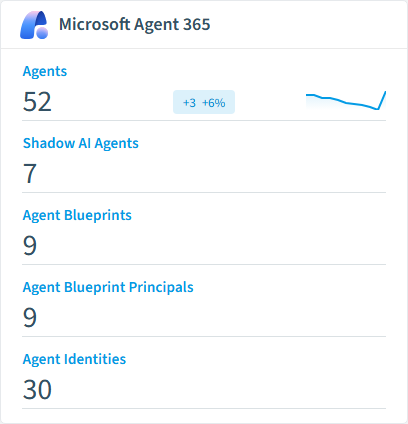
Agent
Agents and apps registered in the tenant agent registry (Microsoft 365 admin center > Agents > All agents). Each package may contain one or more elements (declarative agent, custom-engine agent, bot, Office add-in).
Agent Element
Individual elements (declarative agents, custom engine agents, bots, add-ins) contained within a agent package.
Agent Capability
Reusable capability (e.g. WebSearch, CodeInterpreter, GraphConnectors). Its relations list every agent that can use it.
Agent Knowledge Source
Reusable knowledge source an agent reads from (e.g. a SharePoint site or Graph connector). Its relations list every agent that reads from it.
Agent Action
Reusable action an agent can perform against an external system (e.g. sendEmail, createTask). Its relations list every agent that can perform it.
Shadow AI Agent
Unmanaged local AI tools and agents (chatbots, coding assistants, local models, agentic CLIs) detected on Intune-managed devices that were not approved by IT.
Microsoft Agent 365 inventory card in Rencore

So funktioniert Microsoft Agent 365 Governance in Rencore

Rencore verbindet sich mit Microsoft Agent 365 und inventarisiert Agenten, Agenten-Blueprints, Agentenidentitäten, Fähigkeiten, Wissensquellen, Aktionen und Agentenbenutzer. Es erkennt zudem Shadow-AI-Agenten auf verwalteten Geräten. Richtlinien bewerten jedes Objekt in jedem Scan-Zyklus und kennzeichnen Verstöße mit Schweregrad und einer empfohlenen Maßnahme.

Die Herausforderung der Agenten-Governance

Agenten handeln mit eigenen Identitäten, Anmeldedaten und Berechtigungen, und eine einzige mandantenweite Bereitstellung kann jeden Benutzer erreichen. Ohne Inventar- und Eigentümerkontrollen bleiben blockierte Agenten aktiv, Blueprints verlieren ihre Eigentümer, und Shadow AI breitet sich auf verwalteten Geräten aus. Rencore bringt Microsoft Agent 365 in dasselbe Governance-Dashboard wie den Rest Ihres Microsoft 365 Bestands.

Wer Microsoft Agent 365 Governance nutzt

M365 Product Owner halten damit das Agenteninventar sauber und die Herausgeber rechenschaftspflichtig. Heads of IT verfolgen die Eigentümerschaft von Blueprints und den Ablauf von Anmeldedaten. CISOs verlassen sich auf die Richtlinien zu Shadow AI und Identität, um das Risiko unverwalteter Agenten zu begrenzen.

Erste Schritte

Verbinden Sie Ihren Microsoft 365 Mandanten. Alle 37 Richtlinien werden beim ersten Scan aktiv und decken Agenten, Blueprints, Identitäten und die Erkennung von Shadow AI ab. Berichte und Segmente füllen sich, sobald das erste Inventar abgeschlossen ist.

Policies

37 governance rules that detect violations and risks.
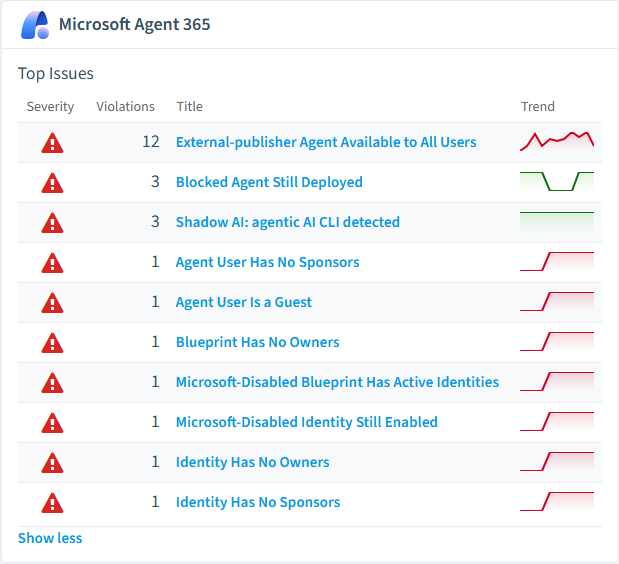
Microsoft Agent 365 policies card in Rencore
Blocked Agent Still Deployed
Flags agents that are blocked in the agent registry but still appear deployed to users, indicating that the block is not being enforced.
High Security
External-publisher Agent Available to All Users
Identifies external-publisher agents that every user in the tenant can find and install, which is a common oversharing pattern after a broad initial enablement.
High External Access
Shadow AI: agentic AI CLI detected
Flags unapproved local agentic AI CLIs and coding agents on managed devices - the highest-risk shadow AI class.
High Security
Microsoft-Disabled Blueprint Has Active Identities
Flags blueprints disabled by Microsoft that still have linked agent identities.
High Security
Blueprint Has No Owners
Flags agent identity blueprints that have no owners registered in the owners collection.
High Operation
Identity Has No Owners
Flags agent identities that have no owners registered.
High Operation

Need a rule that isn't listed? Rencore's Policy Builder lets you create custom policies tailored to your organization.

Reports

5 analytics views and dashboards.
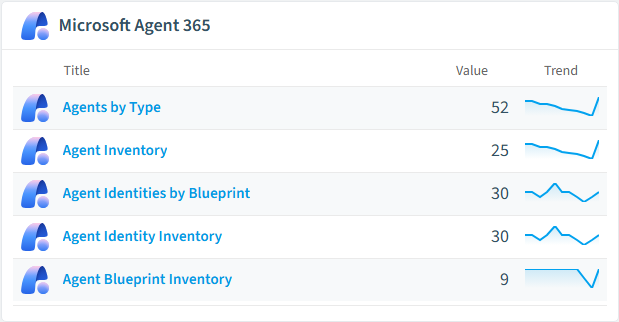
Agents by Type
Breaks down the tenant agent registry by package source type (custom, external, builtin).
Donut Chart · Operation
Agent Inventory
Full inventory of agents and apps in the tenant agent registry.
List · Operation
Agent Identities by Blueprint
Counts agent identities per blueprint, computed by matching agentIdentityBlueprintId to a blueprint's appId.
Bar Chart · Operation
Agent Identity Inventory
Full inventory of Microsoft Entra agent identities.
List · Operation
Agent Blueprint Inventory
Full inventory of Microsoft Entra agent identity blueprints with owner / sponsor / linked-identity counts.
List · Operation
Microsoft Agent 365 reports card in Rencore

Automations

11 automated remediation workflows.

Block shadow AI agent
Creates an Intune device configuration policy to block an unsanctioned AI agent on managed devices.
Notify about shadow AI agent
Sends an email notifying the responsible user or owner that an unsanctioned AI tool was detected.
Disable agent identity
Disables a Microsoft Entra agent identity so it can no longer authenticate.
Notify about orphaned agent identity
Sends an email to an administrator that an agent identity has no registered sponsor and needs one assigned.
Remind about agent credential rotation
Sends an email reminder that an agent identity's or blueprint's credential is expiring soon.
Mark shadow AI agent as approved
Marks a shadow AI agent as sanctioned so it is excluded from the Shadow AI policies.
Delete agent identity
Permanently deletes a Microsoft Entra agent identity via DELETE /servicePrincipals/{id}.
Rename agent identity
Updates the displayName of a Microsoft Entra agent identity via PATCH /servicePrincipals/{id}.
Rename agent blueprint
Updates the displayName of a Microsoft Entra agent identity blueprint via PATCH /applications/{id}.
Delete agent blueprint
Permanently deletes a Microsoft Entra agent identity blueprint via DELETE /applications/{id}. Cascades to its child agent identities.
Disable agent blueprint principal (kill switch)
Sets accountEnabled = false on the agent identity blueprint principal via PATCH /servicePrincipals/{id} - the tenant-wide kill switch for every agent identity created from this blueprint.

Segments

16 data groupings for targeted filtering.

Custom AgentsAgents Deployed Tenant-WideAgents from External PublishersDeclarative AgentsBlocked AgentsMicrosoft-Disabled Blueprints with Active IdentitiesBlueprints without OwnersBlueprints without SponsorsUnused BlueprintsBlueprints Using Password CredentialsBlueprints with Credential Expiring Within 30 DaysIdentities without OwnersIdentities without SponsorsShadow AI: All AgentsShadow AI: Agentic CLIsShadow AI: Local AI

Häufig gestellte Fragen

Wie steuert Rencore KI-Agents über Microsoft Copilot hinaus?
Rencore verbindet sich mit 15+ KI-Plattformen, Claude, OpenAI, Gemini, GitHub Copilot, Cursor, Windsurf, AWS Bedrock, Azure AI Foundry, Glean und LangDock. Jeder Konnektor inventarisiert Benutzer, Workspaces, API-Schlüssel und Kosten mit herstellerspezifischen Governance-Richtlinien. Herstellerübergreifende Dashboards zeigen KI-Gesamtausgaben, Zugriffsmuster und Richtlinienverstöße aus einer einzigen Governance-Konsole.
Was ist Rencore Governance?
Rencore Governance ist eine SaaS-Plattform, die Ihren Microsoft 365 Mandanten kontinuierlich auf Richtlinienverstöße, Konfigurationsabweichungen und Sicherheitsrisiken über SharePoint, Teams, Power Platform, Copilot und AI Agents hinweg überwacht. Sie automatisiert das Sammeln von Compliance-Nachweisen, deckt Oversharing und Wildwuchs auf und stellt umsetzbare Workflows zur Behebung bereit. Das senkt den manuellen Aufwand für Audits um bis zu 80 %.
Unterstützt Rencore Governance für KI-Tools über Microsoft Copilot hinaus?
Ja. Rencore verbindet sich mit Claude, OpenAI, Gemini, GitHub Copilot, Cursor, Windsurf, AWS Bedrock, Azure AI Foundry und weiteren KI-Plattformen. Jeder Connector liefert maßgeschneiderte Richtlinien für Kostenkontrolle, Sicherheit, Adoptionsverfolgung und Zugriffssteuerung und gibt der IT eine einheitliche Governance-Sicht über alle KI-Tools, die die Organisation nutzt.

Vertraut von

MAPALBAMVille de LuxembourgWACKERGRUNDFOSAMGENOsramLufthansaThyssenKruppSunrisePattern







