
Teams

Rencore überwacht Microsoft Teams über 24 Governance-Richtlinien, 7 Berichte und 11 Segmente und erkennt Team-Wildwuchs, Risiken des Gastzugriffs und inaktive Workspaces automatisch.

Veröffentlicht For M365-Produktverantwortlicher, IT-Administrator, IT-Leiter
Digital WorkplaceAI & Agents
Definition

Rencore Teams Governance ist ein Satz aus 24 Richtlinien, 7 Berichten und 11 Segmenten, der Microsoft Teams laufend auf Wildwuchs, Verstöße beim Gastzugriff, inaktive Teams und Abweichungen von Namensstandards prüft. Sie identifiziert Teams mit externen Gästen, die Eigentümer-Zugriff haben, Teams ohne aktuelle Aktivität, die weiterhin Ressourcen verbrauchen, und Verstöße gegen Namenskonventionen und leitet dann jeden Fund zur Lösung an den richtigen Eigentümer weiter.

Teams in Rencore erleben

Schritt 1 von 4

76 governance capabilities: 9 inventories · 24 policies · 7 reports · 11 segments · 5 automations · 8 provisioning templates

Why govern Teams with Rencore

Team-Wildwuchs steuern

Erkennen Sie inaktive Teams (über 90 Tage ohne Beiträge oder Besprechungen), doppelte Teamnamen und Teams ohne Eigentümer. Priorisieren Sie die Bereinigung nach Team-Alter, Mitgliederzahl und verbrauchtem Speicher.

Risiken des Gastzugriffs verwalten

Finden Sie Teams, in denen externe Gäste Eigentümer-Berechtigungen haben, Teams mit übermäßiger Gästezahl oder Gäste, deren Einladungen abgelaufen sind, deren Zugriff aber bestehen bleibt.

Namens- und Erstellungsstandards durchsetzen

Kennzeichnen Sie Teams, die gegen Namenskonventionen verstoßen, Teams, die ohne erforderliche Metadaten erstellt wurden, und Teams ohne Klassifizierungsbezeichnungen, die von Compliance-Richtlinien gefordert werden.

Adoption und Nutzung verfolgen

Berichte zeigen Aktivitätstrends je Team, die aktivsten Kanäle, die Verteilung der App-Nutzung und den Speicherverbrauch und helfen der IT, ihre Teams-Umgebung richtig anzupassen.

What Rencore discovers

Rencore automatically inventories these Teams object types.
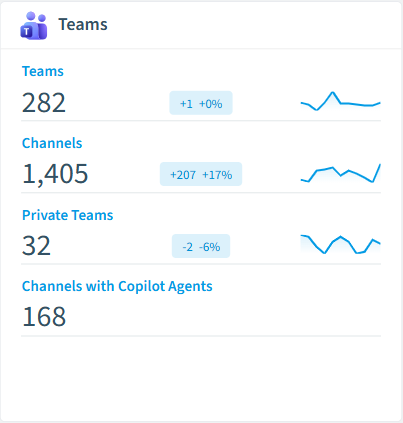
Team
All teams in your tenant
Channel
All Channels of the Team
Tab
All tabs of your teams in your tenant
App
All installed Teams apps in your tenant
Deleted Team
All teams that have been deleted
Usage
Details about Teams usage in the last 180 days
Teams inventory card in Rencore

So funktioniert Teams Governance in Rencore

Rencore verbindet sich über die Microsoft Graph-API mit Microsoft Teams und inventarisiert jedes Team, jeden Kanal und jede Gastmitgliedschaft im Mandanten. Richtlinien bewerten jedes Objekt anhand konfigurierbarer Governance-Regeln und kennzeichnen Verstöße mit Schweregrad, Kategorie und empfohlener Maßnahme.

Wer Teams Governance nutzt

M365 Product Owner nutzen Teams Governance, um Workspace-Wildwuchs zu verhindern und Erstellungsstandards durchzusetzen. IT-Administratoren überwachen Muster des Gastzugriffs und inaktive Teams, um die Sicherheitsexposition zu verringern. Heads of IT nutzen die Berichte, um Governance-Investitionen mit konkreten Daten zu Wildwuchs und Adoption zu begründen.

Erste Schritte

Verbinden Sie Ihren Microsoft 365-Mandanten, und die Teams-Richtlinien werden innerhalb des ersten Scans aktiv. Rencore nutzt schreibgeschützte Microsoft Graph-Berechtigungen, keine Installation einer Teams-App oder Registrierung eines Bots erforderlich. Alle 24 Richtlinien laufen in jedem Scan-Zyklus automatisch.

Policies

24 governance rules that detect violations and risks.
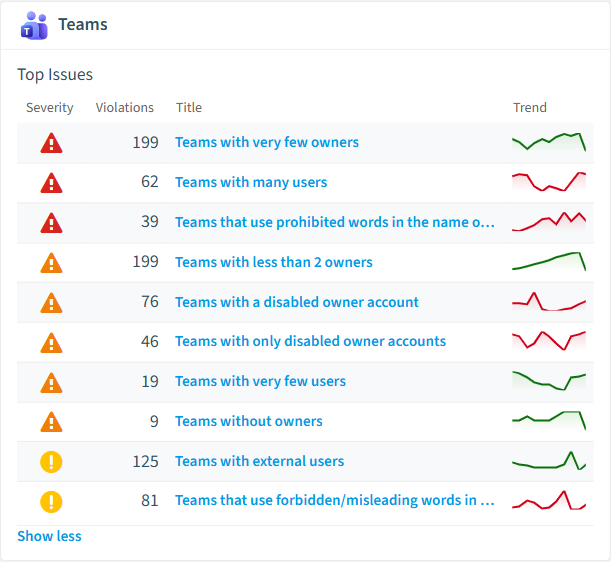
Teams policies card in Rencore
Teams with very few owners
Shows Teams which have 1 or no owner
High Operation
Teams with many users
Shows Teams with a number of users that exceeds a threshold (default 50 users)
High Operation
Teams that use prohibited words in the name or description
Shows teams that use a list of prohibited words in the name or description
High Operation
Team contains Copilot agent and external members
Detects Team where a Copilot agent is installed and external users are present, posing security concerns.
High Security
Public team
Public teams can be discovered and joined by anyone in the organization, raising the likelihood of exposure.
Medium Operation
Team has many members
Teams with a large membership have a wider audience, raising the likelihood of exposure.
Medium Operation

Need a rule that isn't listed? Rencore's Policy Builder lets you create custom policies tailored to your organization.

Reports

7 analytics views and dashboards.
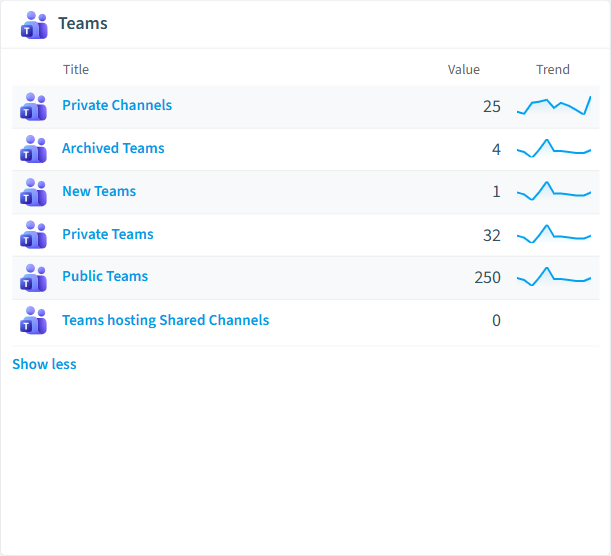
Archived Teams
All Teams that have been archived
List · Uncategorized
New Teams
All Teams scanned the first time in the last 14 days
List · Uncategorized
Private Teams
All Teams that are marked as private
List · Uncategorized
Public Teams
All teams that are visible to everyone in the organization
List · Uncategorized
Private Channels
All private channels in Teams
List · Uncategorized
Teams Pre-Scan
Regular scans for a large amount of Teams may require dedicated database in Rencore Governance
Donut Chart · Operation
Teams reports card in Rencore

Automations

5 automated remediation workflows.

Set teams to private by default
Sets public teams to private and informs teams owners about the change
Mark teams with external users
Add External indicator to team title if a team contains external users.
Archive unused teams
Automatically archives unused MS Teams teams
Send one email per Team owner
Send an email to every owner of one Microsoft Teams team and directly addresses the user by first and last name
Send a combined email to all owners of a Team
Send a single (combined) email to the owners of one Microsoft Teams team

Segments

11 data groupings for targeted filtering.

Archived TeamsNew TeamsPrivate TeamsPublic TeamsPrivate ChannelsShared ChannelsStore AppsOrganization appsAgents published to Teams app catalogTeams with AgentsChannels with Copilot Agents

Provisioning templates

8 resource creation templates.

Custom Team
Start with an empty Team and configure policies, channels and apps from scratch
Manage a Project
Manage tasks, share documents, conduct project meetings and document risks and decisions with this template for general project management.
Department Workspace
Manage communication inside a department with a team for chat based communication and a SharePoint site for document collaboration.
Manage an Event
Manage tasks, documents, and collaborate on everything you need to deliver a compelling event. Invite guest users to have a secure collaboration inside and outside of your company.
Onboard Employees
Improve your culture and streamline your employee onboarding with this central team for resources, questions, and a bit of fun.
Product Development Workspace
Work together in product development, organize tasks, meeting notes and documents.
Organize Help Desk
Collaborate on documentation, policy, and processes that support your help desk. Integrate your existing ticketing system or use our template to manage requests.
Private Team
Use this template for internal collaboration with your colleagues, to discuss topics, share ideas and documents.

Häufig gestellte Fragen

Was ist Teams Governance?
Teams Governance ist die Praxis, die Erstellung von Teams, den Gastzugriff, Namensstandards und den Lebenszyklus über Microsoft Teams hinweg zu steuern. Sie verhindert Wildwuchs (verlassene Teams, doppelte Workspaces), reduziert Sicherheitsrisiken (externe Gäste mit zu weitreichendem Zugriff) und hält die Umgebung für die Zusammenarbeit prüfbar und konform mit den Organisationsrichtlinien.
Kann Rencore Microsoft Teams steuern?
Ja. Rencore bietet 22 Teams-spezifische Governance-Richtlinien, 7 Berichte und 8 Segmente, die Team-Wildwuchs, Gastzugriff, inaktive Teams, Namenskonventionen und App-Berechtigungen abdecken. Rencore erkennt Teams-Objekte und wendet Richtlinien automatisch an, um Governance-Verstöße im gesamten Mandanten aufzudecken.
Was ist Rencore Governance?
Rencore Governance ist eine SaaS-Plattform, die Ihren Microsoft 365 Mandanten kontinuierlich auf Richtlinienverstöße, Konfigurationsabweichungen und Sicherheitsrisiken über SharePoint, Teams, Power Platform, Copilot und AI Agents hinweg überwacht. Sie automatisiert das Sammeln von Compliance-Nachweisen, deckt Oversharing und Wildwuchs auf und stellt umsetzbare Workflows zur Behebung bereit. Das senkt den manuellen Aufwand für Audits um bis zu 80 %.

Vertraut von

MAPALBAMVille de LuxembourgWACKERGRUNDFOSAMGENOsramLufthansaThyssenKruppSunrisePattern







