
Private Preview

Zoom

Rencore monitors Zoom across 23 governance policies, 12 reports, and 8 inventories, detecting license waste, meeting security risks, and user lifecycle issues automatically.

Published For IT Admin, Head of IT, CISO
Digital Workplace

Zoom is in private preview. Join the waiting list and we will reach out when access opens up.

Join the waiting list
Definition

Rencore Zoom governance is a set of 23 policies, 12 reports, 13 segments, and 8 inventories that continuously audit Zoom for user lifecycle issues, meeting security gaps, and license waste. It detects users deactivated in Entra ID who retain Zoom access, meetings configured without passwords or waiting rooms, inactive licenses that can be reclaimed, and user settings that bypass organizational security policies.

See Zoom in Rencore

Step 1 of 4

63 governance capabilities: 8 inventories · 23 policies · 12 reports · 13 segments · 2 automations

Why govern Zoom with Rencore

Manage user lifecycle

Detect Zoom users deactivated in Entra ID who still have active accounts, inactive users who haven't joined a meeting in 90+ days, and external users without business justification.

Enforce meeting security

Find meetings configured without passwords, meetings missing waiting room requirements, and recording settings that bypass organizational data protection policies.

Optimize license costs

Identify inactive licenses that can be reclaimed, users with premium features they don't use, and license types mismatched to actual usage patterns.

Track adoption and usage

12 reports show meeting trends, user activity patterns, feature adoption, and license utilization. Segment the user base by department, role, and activity level.

What Rencore discovers

Rencore automatically inventories these Zoom object types.
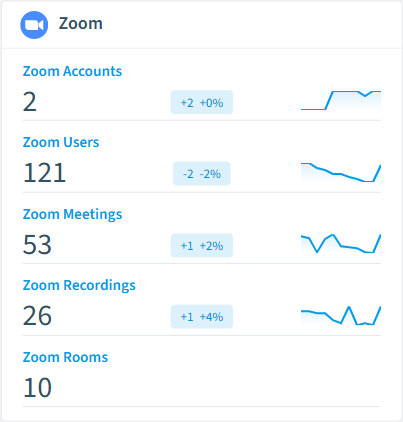
Zoom Account
All Zoom accounts
Zoom User
All Zoom users
Zoom Meeting
All Zoom meetings
Zoom Recording
All Zoom cloud recordings
Zoom Room
All Zoom Rooms
Zoom Group
All Zoom groups
Zoom inventory card in Rencore

How Zoom governance works in Rencore

Rencore connects to Zoom via the Zoom API and inventories users, meetings, settings, recordings, and license assignments. It links Zoom users to M365 users by email for cross-platform identity governance. Policies run on every scan cycle and flag lifecycle, security, and license issues.

Who uses Zoom governance

IT administrators use it to maintain clean Zoom user accounts and enforce meeting security standards. CISOs rely on meeting security policies to detect configurations that expose organizational data. Heads of IT use license reports to optimize Zoom spending and justify renewals.

Getting started

Provide Rencore with Zoom API credentials (OAuth or JWT). All 23 policies activate on first scan, covering users, meetings, and licenses. Rencore links Zoom users to Entra ID automatically.

Policies

23 governance rules that detect violations and risks.
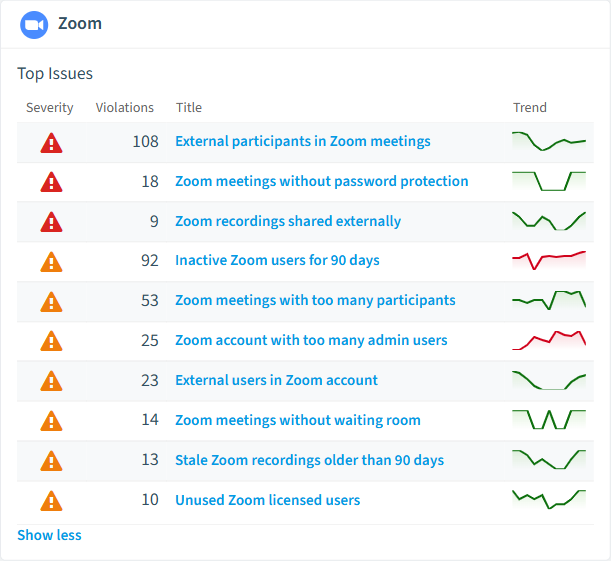
Zoom policies card in Rencore
Meeting reachable without host screening
Meetings without a waiting room admit anyone with the link, raising the likelihood that a weakness is exploited
High Security
Meeting joinable with link alone
Meetings without a passcode are reachable by anyone with the link, raising exploitation likelihood
High Security
Recording publicly reachable
Recordings with a public share URL are reachable by anyone with the link, raising leakage likelihood
High Security
User holds administrative privileges
Admin users have a wide blast radius, raising the likelihood that any weakness is exploited
High Security
Zoom meetings without password protection
Detects scheduled meetings that do not require a passcode to join
High Security
Zoom recordings shared externally
Detects cloud recordings with external/public sharing enabled
High Security

Need a rule that isn't listed? Rencore's Policy Builder lets you create custom policies tailored to your organization.

Reports

12 analytics views and dashboards.
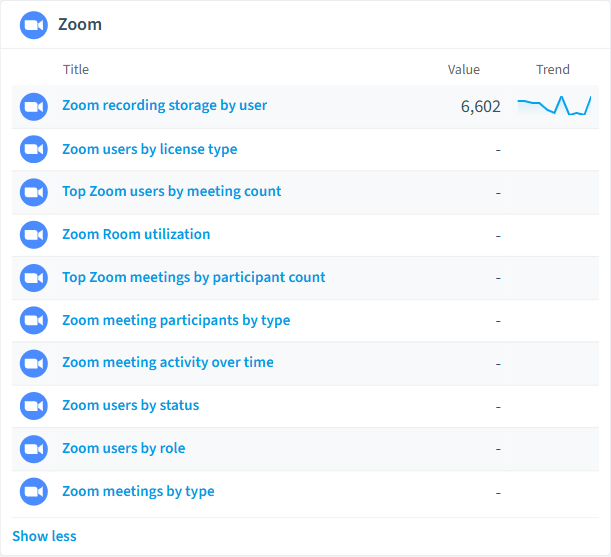
Zoom users by license type
Shows the distribution of users by license type (Basic, Licensed, On-Prem)
Donut Chart · Costs
Top Zoom users by meeting count
Shows the top 10 users with the most meetings
Bar Chart · Adoption
Zoom recording storage by user
Shows the top users by cloud recording storage used (MB)
Bar Chart · Costs
Zoom Room utilization
Shows Zoom Room status distribution
Bar Chart · Operation
Top Zoom meetings by participant count
Shows the top 10 meetings with the most participants
Bar Chart · Adoption
Zoom meeting participants by type
Shows the distribution of internal vs external meeting participants
Donut Chart · Security
Zoom reports card in Rencore

Automations

2 automated remediation workflows.

Deactivate Zoom User
Deactivates a Zoom user account
Delete Zoom Recording
Deletes a Zoom cloud recording

Segments

13 data groupings for targeted filtering.

Zoom Admin UsersZoom Licensed UsersZoom Basic UsersZoom Inactive UsersZoom Pending UsersShared RecordingsRecordings older than 90 daysOffline Zoom RoomsActive Zoom RoomsExternal Zoom ParticipantsShort-Attendance Zoom ParticipantsLarge Zoom MeetingsZoom Meetings with External Participants

Frequently asked questions

What governance areas does Rencore cover?
Rencore covers six governance pillars: visibility and inventory across all Microsoft 365 services, ready-to-go policies with over 100 pre-built governance checks, compliance and audit evidence collection for regulatory requirements, extensibility and customization through custom policies and automations, cross-department collaboration with shared dashboards and role-based access, and AI and Copilot readiness to prepare tenants for secure AI adoption.
What is Rencore governance?
Rencore governance is a SaaS platform that continuously monitors your Microsoft 365 tenant for policy violations, configuration drift, and security risks across SharePoint, Teams, Power Platform, Copilot, and AI Agents. It automates compliance evidence collection, surfaces oversharing and sprawl, and provides actionable remediation workflows, reducing manual audit effort by up to 80%.
How do Rencore policies work?
Rencore ships with hundreds of pre-built policies that detect governance violations across every connector, oversharing, sprawl, cost overruns, security risks, and compliance gaps. Policies run on a continuous schedule, evaluate each discovered object against configurable rules, and flag violations with severity (High, Medium, Low), category, and a recommended action.

Related guides

Trusted by

MAPALBAMVille de LuxembourgWACKERGRUNDFOSAMGENOsramLufthansaThyssenKruppSunrisePattern







