
Snowflake

Rencore monitors Snowflake across 43 governance policies, 10 reports, and 22 inventories, detecting users without MFA, ACCOUNTADMIN-owned objects, unrestricted network policies, and costly always-on warehouses automatically.

Published For CISO, Head of IT, CIO / CXO
AI & Agents
Definition

Rencore Snowflake governance is a set of 43 policies, 10 reports, and 22 inventories that continuously audit Snowflake for weak authentication, over-privileged ACCOUNTADMIN ownership, unrestricted network access, and runaway warehouse cost. It detects users without MFA, objects owned by ACCOUNTADMIN, network policies with no IP restriction, and warehouses that never auto-suspend or exceed their credit budget.

See Snowflake in Rencore

Step 1 of 3

90 governance capabilities: 22 inventories · 43 policies · 10 reports · 12 segments · 1 automations

Why govern Snowflake with Rencore

Enforce strong authentication

Detect users without MFA, users with password-only authentication, and service accounts using passwords. Flag open MFA bypass windows and OAuth secrets overdue for rotation before they are exploited.

Lock down privileged ownership

Find databases, warehouses, schemas, secrets, and stages owned by ACCOUNTADMIN, users defaulting to ACCOUNTADMIN, accounts with too many role grants, and orphan custom roles.

Secure network and data access

Identify network policies with no IP or network-rule restriction, outbound network rules, external stages without a storage integration, stages with stored credentials, and external volumes that allow writes.

Control warehouse cost

Flag warehouses without auto-suspend or a resource monitor, oversized running warehouses, warehouses unused in the last 30 days, high credit consumption, and databases with excessive Time Travel retention or large storage.

What Rencore discovers

Rencore automatically inventories these Snowflake object types.
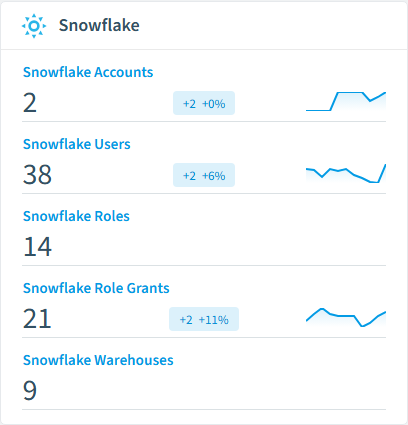
Snowflake Account
Snowflake accounts that are configured to be scanned
Snowflake User
Users with access to the Snowflake account
Snowflake Role
Roles defined in the Snowflake account
Snowflake Role Grant
Role grants assigned to users and roles in the Snowflake account
Snowflake Warehouse
Virtual warehouses (compute resources) in the Snowflake account
Snowflake Database
Databases in the Snowflake account
Snowflake inventory card in Rencore

How Snowflake governance works in Rencore

Rencore connects to Snowflake and inventories accounts, users, roles, role grants, warehouses, databases, schemas, network policies, network rules, password policies, secrets, stages, and integrations. Policies evaluate each object on every scan cycle and flag violations with severity and a recommended action.

The data-platform governance challenge

Snowflake stores some of the most sensitive data in the organization, yet its identity, network, and cost controls sit outside Microsoft 365 oversight. A user without MFA or a warehouse left running is invisible to Entra ID and Microsoft Purview. Rencore brings Snowflake governance into the same dashboard as your Microsoft 365 governance, applying consistent identity, access, and cost checks.

Who uses Snowflake governance

CISOs use the authentication and network policies to close data-exposure gaps. Heads of IT track ACCOUNTADMIN ownership and role sprawl. CIOs and CXOs use the warehouse cost reports to keep Snowflake credit consumption under control.

Getting started

Provide Rencore with Snowflake API access. All 43 policies activate on the first scan, covering users, roles, warehouses, network policies, and stages. Cost and usage reports populate as soon as the first inventory completes.

Policies

43 governance rules that detect violations and risks.
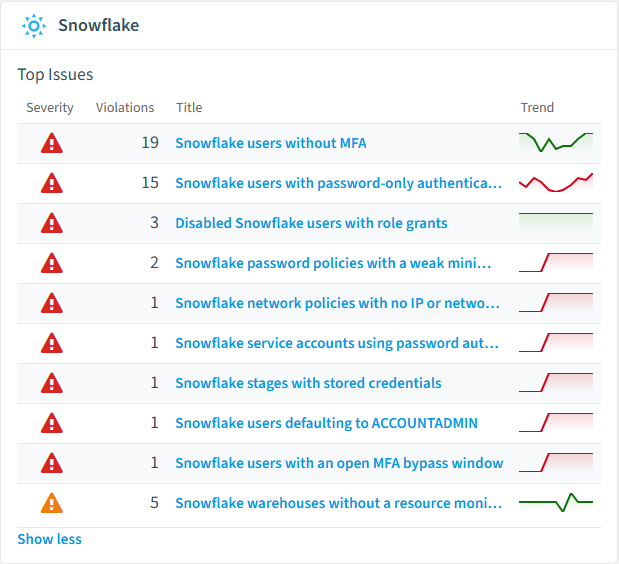
Snowflake policies card in Rencore
Disabled Snowflake users with role grants
Detects disabled users that still have role grants assigned
High Security
Snowflake users without MFA
Detects active users that do not have multi-factor authentication enabled
High Security
Snowflake stages with stored credentials
Detects stages that store inline credentials instead of using a storage integration
High Security
Snowflake users defaulting to ACCOUNTADMIN
Detects active users whose default role is the privileged ACCOUNTADMIN role
High Security
Snowflake network policies with no IP or network-rule restriction
Detects network policies that define neither an allowed IP list nor any allowed network rule
High Security
Snowflake users with password-only authentication
Detects active users that have neither MFA nor a key-pair configured
High Security

Need a rule that isn't listed? Rencore's Policy Builder lets you create custom policies tailored to your organization.

Reports

10 analytics views and dashboards.
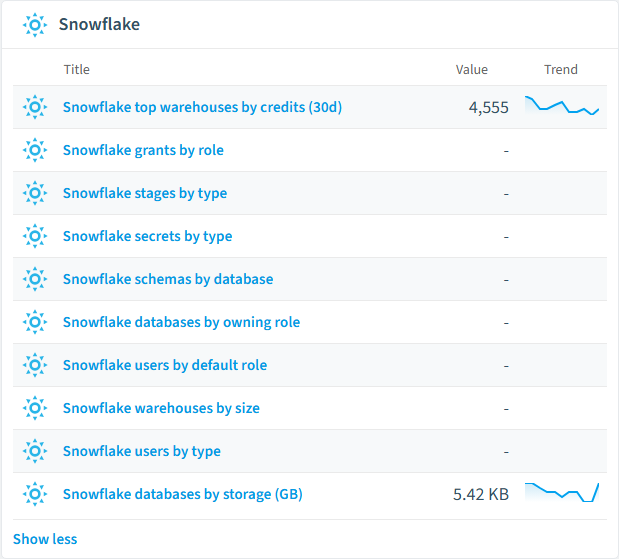
Snowflake grants by role
Shows the top 10 most granted roles and the number of grants per role
Bar Chart · Security
Snowflake stages by type
Shows the number of stages grouped by type (internal/external)
Bar Chart · Security
Snowflake secrets by type
Shows the distribution of secrets by secret type
Column Chart · Security
Snowflake schemas by database
Shows the number of schemas per database
Bar Chart · Operation
Snowflake databases by owning role
Shows how database ownership is distributed across roles
Bar Chart · Security
Snowflake users by default role
Shows the distribution of users across their default roles
Column Chart · Security
Snowflake reports card in Rencore

Automations

1 automated remediation workflows.

Disable Snowflake User with Lingering Grants
When a disabled user is found still holding role grants, ensure the user account is disabled.

Segments

12 data groupings for targeted filtering.

Snowflake Users without MFADisabled Snowflake UsersSuspended Snowflake WarehousesSnowflake Stages with Stored CredentialsSnowflake Schemas without Managed AccessDisabled Snowflake API IntegrationsSnowflake Databases owned by ACCOUNTADMINSnowflake Users defaulting to ACCOUNTADMINSnowflake Service AccountsSnowflake Warehouses that never auto-suspendSnowflake Users with an open MFA bypassSnowflake Orphan Custom Roles

Frequently asked questions

What governance areas does Rencore cover?
Rencore covers six governance pillars: visibility and inventory across all Microsoft 365 services, ready-to-go policies with over 100 pre-built governance checks, compliance and audit evidence collection for regulatory requirements, extensibility and customization through custom policies and automations, cross-department collaboration with shared dashboards and role-based access, and AI and Copilot readiness to prepare tenants for secure AI adoption.
What is Rencore governance?
Rencore governance is a SaaS platform that continuously monitors your Microsoft 365 tenant for policy violations, configuration drift, and security risks across SharePoint, Teams, Power Platform, Copilot, and AI Agents. It automates compliance evidence collection, surfaces oversharing and sprawl, and provides actionable remediation workflows, reducing manual audit effort by up to 80%.
How do Rencore policies work?
Rencore ships with hundreds of pre-built policies that detect governance violations across every connector, oversharing, sprawl, cost overruns, security risks, and compliance gaps. Policies run on a continuous schedule, evaluate each discovered object against configurable rules, and flag violations with severity (High, Medium, Low), category, and a recommended action.

Related guides

Trusted by

MAPALBAMVille de LuxembourgWACKERGRUNDFOSAMGENOsramLufthansaThyssenKruppSunrisePattern







