
Connectors · Microsoft

OneDrive

Rencore monitors OneDrive across 34 governance policies, 8 reports, and 4 inventories, detecting storage quota risks, anonymous and external sharing exposure, dormant sites, and stale files automatically.

Digital Workplace
Last reviewed For M365 Product Owner, IT Admin, CISO

Rencore OneDrive governance is a set of 34 policies, 8 reports, 10 segments, and 4 inventories that audit OneDrive for Business across storage quotas, sharing posture, and lifecycle. It detects OneDrives over 75 percent of quota, anonymous links with edit permission, external shares without expiration, dormant accounts, and OneDrive files older than 5 years, supplying IT with the data needed to reclaim storage and reduce Copilot data-exposure risk.

62 governance capabilities: 4 inventories · 34 policies · 8 reports · 10 segments · 3 automations

Why govern OneDrive with Rencore

  • Manage storage and quotas

    Flag OneDrives over 1 TB, OneDrives past 75 percent of quota, OneDrives in nearing or exceeded state, and accounts holding more than 100,000 documents or 10 GB in recycle bin. Plan quota increases or archival before users hit hard limits.

  • Close anonymous and external sharing gaps

    Detect anonymous links with edit permission, org-wide sharing links, external users with direct (non-link) access, external shares without expiration, and shares created by disabled accounts. Reduce Copilot oversharing risk at the source.

  • Clean up inactive accounts and stale files

    Find OneDrives belonging to disabled users, dormant OneDrives unchanged in 12 or 24 months, orphaned OneDrives with more than 1,000 documents, and files older than 1, 2, or 5 years. Reclaim storage and tidy up the index Copilot reasons over.

  • Track sharing and storage trends

    8 reports cover OneDrive storage by geography and department, top 10 largest OneDrives, top 10 by external sharings, link-kind distribution, monthly creation trend, and last-modified distribution.

What Rencore discovers

Rencore automatically inventories these OneDrive object types.
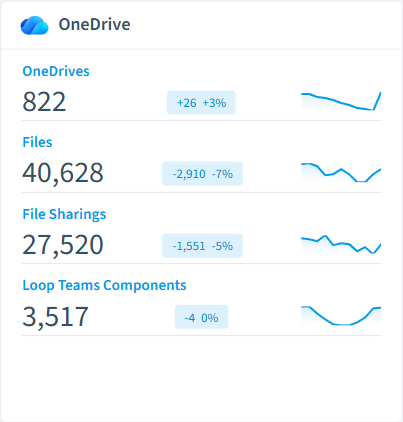
  • OneDrive

    All of your users OneDrives in your tenant

  • File

    All OneDrive files stored in a library of a OneDrive

  • Folder

    All OneDrive folders stored in a library of a OneDrive

  • File Sharing

    All shared OneDrives items with their sharing information

OneDrive inventory card in Rencore

How OneDrive governance works in Rencore

Rencore connects to OneDrive for Business via the Microsoft Graph API and inventories four object types: OneDrives, files, folders, and file sharings. The 34 policies run on every scan cycle, evaluating each OneDrive and shared item against quota, sharing, and lifecycle rules with severity levels.

Who uses OneDrive governance

M365 product owners use storage and quota policies to plan tenant-level capacity. IT administrators rely on the 10 reusable segments (dormant OneDrives, large OneDrives, expired-but-active shares, externally shared files) to drive cleanup campaigns. CISOs use the anonymous-link and external-access policies as part of Copilot data readiness, since every overshared file is a candidate for Copilot retrieval.

Getting started

Connect your Microsoft 365 tenant. All 34 OneDrive policies activate on first scan alongside your existing M365 governance, with no additional configuration needed. Reports cover storage by geography, by department, and by sharing posture so you can see exposure at a glance.

Policies

34 governance rules that detect violations and risks.
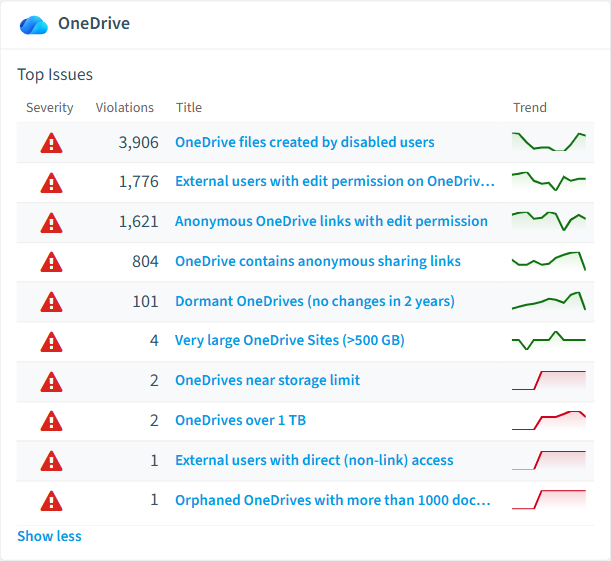
OneDrive policies card in Rencore
  • OneDrives near storage limit

    Shows OneDrives using more than 90% of their available storage space

    High Costs
  • OneDrive contains anonymous sharing links

    OneDrives that contain at least one file shared via an anonymous "anyone with the link" link.

    High External Access
  • Anonymous OneDrive links with edit permission

    Anonymous "anyone with the link" shares that grant edit permission.

    High External Access
  • External users with edit permission on OneDrive files

    Sharings where an external user has edit permission on a OneDrive file.

    High External Access
  • External users with direct (non-link) access

    External users granted direct access to OneDrive files without going through a sharing link.

    High External Access
  • OneDrive shares created by disabled accounts

    Sharings whose creator account has since been disabled.

    High User Offboarding

Need a rule that isn't listed? Rencore's Policy Builder lets you create custom policies tailored to your organization. Learn more about the Policy Builder

Reports

8 analytics views and dashboards.
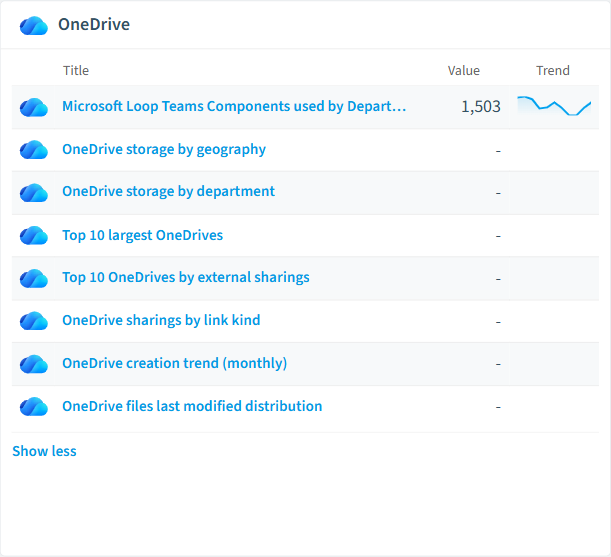
  • Microsoft Loop Teams Components used by Department

    All Loop components of users grouped by their department

    Pie Chart · Uncategorized

  • OneDrive storage by geography

    Total OneDrive storage usage grouped by the geographic location of the drive.

    Bar Chart · Costs

  • OneDrive storage by department

    Total OneDrive storage usage grouped by the owning user's department.

    Bar Chart · Costs

  • Top 10 largest OneDrives

    The ten OneDrives consuming the most storage in the tenant.

    Bar Chart · Costs

  • Top 10 OneDrives by external sharings

    The ten OneDrives with the most external sharings, ranked by share count.

    Bar Chart · External Access

  • OneDrive sharings by link kind

    Distribution of OneDrive sharings across the different link kinds (view/edit, internal/external, anonymous).

    Pie Chart · External Access

OneDrive reports card in Rencore

Automations

3 automated remediation workflows.

  • Remind OneDrive Owners of externally shared files

    Remind OneDrive Owners on a monthly basis to policy for files that have been shared with external users.

  • Warn OneDrive owners if their OneDrive reaches storage limit

    Sends an email to OneDrive owners once their OneDrive has reached more than 90% of storage limit.

  • Send one email per OneDrive owner

    Send an email to every owner of one OneDrive and directly addresses the user by first and last name

Segments

10 data groupings for targeted filtering.

  • Expired OneDrive File Sharings

    Shows OneDrive File Sharings file sharings which have reached their expiration date

  • Loop Teams Components

    All Loop components stored in Microsoft OneDrives

  • Externally shared OneDrive files

    All OneDrive file sharings that target an external user.

  • OneDrive anonymous sharing links

    All OneDrive file sharings that are anonymous "anyone with the link" links.

  • Dormant OneDrives

    OneDrives that have not been modified in more than 12 months.

  • Large OneDrives

    OneDrives using more than 100 GB of storage.

  • Nearly empty OneDrives

    OneDrives containing fewer than 10 documents.

  • Oversized OneDrive files (>1 GB)

    Individual OneDrive files exceeding 1 GB.

  • Stale OneDrive files (>2 years)

    OneDrive files not modified in over two years.

  • Expired but still active shares

    Sharings whose expiration date has passed but that are still flagged active.

Frequently asked questions

What governance areas does Rencore cover?
Rencore covers six governance pillars: visibility and inventory across all Microsoft 365 services, ready-to-go policies with over 100 pre-built governance checks, compliance and audit evidence collection for regulatory requirements, extensibility and customization through custom policies and automations, cross-department collaboration with shared dashboards and role-based access, and AI and Copilot readiness to prepare tenants for secure AI adoption.
What is Rencore governance?
Rencore governance is a SaaS platform that continuously monitors your Microsoft 365 tenant for policy violations, configuration drift, and security risks across SharePoint, Teams, Power Platform, Copilot, and AI Agents. It automates compliance evidence collection, surfaces oversharing and sprawl, and provides actionable remediation workflows, reducing manual audit effort by up to 80%.
How do Rencore policies work?
Rencore ships with hundreds of pre-built policies that detect governance violations across every connector, oversharing, sprawl, cost overruns, security risks, and compliance gaps. Policies run on a continuous schedule, evaluate each discovered object against configurable rules, and flag violations with severity (High, Medium, Low), category, and a recommended action.

Trusted by

MAPALBAMVille de LuxembourgWACKERGRUNDFOSAMGENOsramLufthansaHoneywellThyssenKruppSunrisePattern

See Rencore in your tenant

Connect your environment in minutes and surface the governance findings that matter on day one.







