
Connectors · deepset Private Preview

Haystack

Rencore monitors Haystack across 17 governance policies, 6 reports, and 18 inventories, detecting pipeline risks, stale components, and data source issues automatically.

AI & Agents
Published For Head of IT, CISO

Haystack is in private preview. Join the waiting list and we will reach out when access opens up.

Join the waiting list

Rencore Haystack governance is a set of 17 policies, 6 reports, 7 segments, and 18 inventories that audit deepset's Haystack AI framework for pipeline security, data source governance, and component lifecycle issues. It detects pipelines with unvetted data connections, components not updated within policy, and deployments consuming resources without recent activity, giving IT visibility into AI pipeline operations.

70 governance capabilities: 18 inventories · 17 policies · 6 reports · 7 segments · 11 automations

Why govern Haystack with Rencore

  • Govern AI pipelines

    Detect pipelines with data connections to unvetted sources, components using deprecated APIs, and pipeline configurations that bypass security controls. Each finding includes severity and recommended action.

  • Manage component lifecycle

    Identify components not updated in 90+ days, stale deployments consuming resources, and pipeline configurations without assigned owners.

  • Track pipeline operations

    Reports show pipeline execution trends, component usage patterns, data source activity, and error rates. Identify pipelines that need maintenance or retirement.

What Rencore discovers

Rencore automatically inventories these Haystack object types.
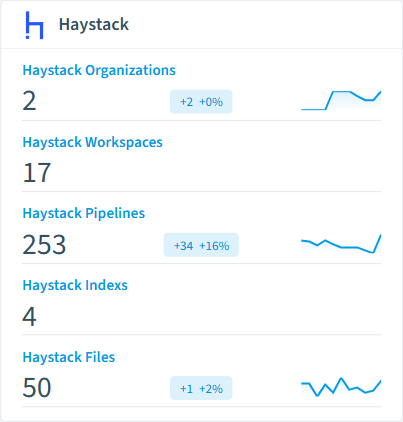
  • Haystack Organization

    Top-level organizational unit in the Haystack platform containing workspaces and users

  • Haystack Workspace

    Isolated environments within an organization for managing pipelines, indexes, and files

  • Haystack Pipeline

    AI processing pipelines that connect components to execute queries and tasks

  • Haystack Index

    Document stores that preprocess and index files for retrieval by pipelines

  • Haystack File

    Uploaded documents processed and stored for retrieval by pipelines

  • Haystack User

    Individual user accounts with access to the Haystack platform

Haystack inventory card in Rencore

How Haystack governance works in Rencore

Rencore connects to Haystack via the deepset API and inventories pipelines, components, data connections, deployments, and usage metrics. Policies run on every scan cycle and evaluate each resource against governance rules, flagging security, lifecycle, and operational issues.

Who uses Haystack governance

CISOs use it to audit data connections feeding AI pipelines and enforce security controls on pipeline configurations. Heads of IT track pipeline operations and identify deployments that need maintenance or retirement.

Getting started

Provide Rencore with Haystack API credentials. All 17 policies activate on first scan, covering pipelines, components, and data connections automatically.

Policies

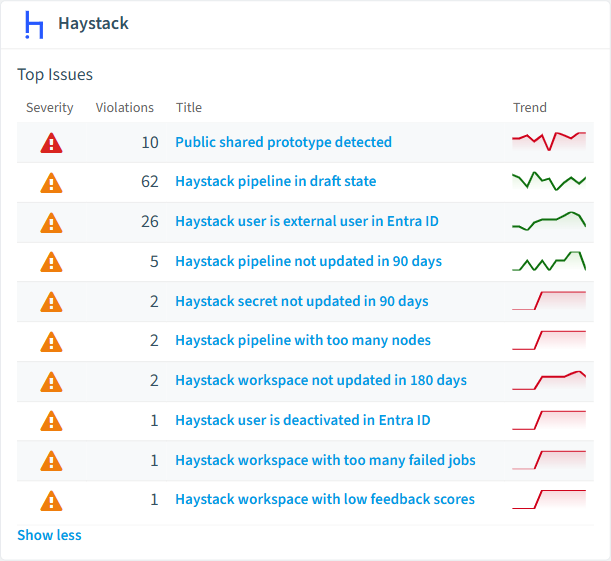
17 governance rules that detect violations and risks.
Haystack policies card in Rencore
  • Public shared prototype detected

    Detects shared prototypes that are publicly accessible

    High Security
  • Haystack user is deactivated in Entra ID

    Detects Haystack users who are deactivated in the parent Entra ID

    Medium Security
  • Haystack user is external user in Entra ID

    Detects Haystack users which are guest in the Entra ID directory

    Medium Security
  • Haystack secret not updated in 90 days

    Detects secrets that have not been rotated in the last 90 days

    Medium Security
  • Expired Haystack API token

    Detects API tokens that have passed their expiration date

    Medium Security
  • Haystack pipeline in draft state

    Detects pipelines that are still in draft status

    Medium Operation

Need a rule that isn't listed? Rencore's Policy Builder lets you create custom policies tailored to your organization. Learn more about the Policy Builder

Reports

6 analytics views and dashboards.
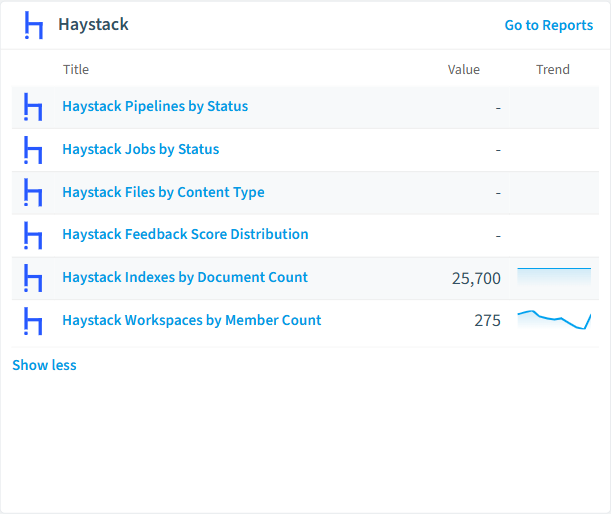
  • Haystack Pipelines by Status

    Shows pipelines grouped by their deployment status

    Donut Chart · Operation

  • Haystack Jobs by Status

    Shows jobs grouped by their status

    Donut Chart · Operation

  • Haystack Files by Content Type

    Shows uploaded files grouped by content type

    Bar Chart · Adoption

  • Haystack Feedback Score Distribution

    Distribution of user feedback scores across all workspaces

    Bar Chart · Operation

  • Haystack Indexes by Document Count

    Top indexes ranked by number of documents

    Bar Chart · Adoption

  • Haystack Workspaces by Member Count

    Top workspaces ranked by number of team members

    Bar Chart · Adoption

Haystack reports card in Rencore

Automations

11 automated remediation workflows.

  • Delete Haystack Pipeline

    Automatically deletes a Haystack pipeline after approval

  • Delete Haystack Workspace

    Automatically deletes a Haystack workspace after approval

  • Delete Haystack User

    Automatically deletes a Haystack user after approval

  • Delete Haystack Index

    Automatically deletes a Haystack index after approval

  • Delete Haystack File

    Automatically deletes a Haystack file after approval

  • Delete Haystack Secret

    Automatically deletes a Haystack secret after approval

  • Delete Haystack Shared Prototype

    Automatically deletes a Haystack shared prototype after approval

  • Delete Haystack Dataset

    Automatically deletes a Haystack dataset after approval

  • Delete Haystack Evaluation Set

    Automatically deletes a Haystack evaluation set after approval

  • Delete Haystack API Token

    Automatically deletes a Haystack API token after approval

  • Change Haystack User Role

    Automatically changes a Haystack user role after approval

Segments

7 data groupings for targeted filtering.

  • Production Haystack Pipelines

    Shows pipelines deployed in production

  • Draft Haystack Pipelines

    Shows pipelines in draft state

  • Failed Haystack Jobs

    Shows jobs with failed status

  • Completed Haystack Jobs

    Shows jobs with completed status

  • Development Haystack Pipelines

    Shows pipelines in development state

  • Large Haystack Indexes

    Indexes with more than 10,000 documents

  • Empty Haystack Indexes

    Indexes with zero documents

Frequently asked questions

Does Rencore support governance for AI tools beyond Microsoft Copilot?
Yes. Rencore connects to Claude, OpenAI, Gemini, GitHub Copilot, Cursor, Windsurf, AWS Bedrock, Azure AI Foundry, and other AI platforms. Each connector provides tailored policies for cost management, security, adoption tracking, and access control, giving IT a unified governance view across all AI tools the organization uses.
What is Rencore governance?
Rencore governance is a SaaS platform that continuously monitors your Microsoft 365 tenant for policy violations, configuration drift, and security risks across SharePoint, Teams, Power Platform, Copilot, and AI Agents. It automates compliance evidence collection, surfaces oversharing and sprawl, and provides actionable remediation workflows, reducing manual audit effort by up to 80%.
How do Rencore policies work?
Rencore ships with hundreds of pre-built policies that detect governance violations across every connector, oversharing, sprawl, cost overruns, security risks, and compliance gaps. Policies run on a continuous schedule, evaluate each discovered object against configurable rules, and flag violations with severity (High, Medium, Low), category, and a recommended action.

Trusted by

MAPALBAMVille de LuxembourgWACKERGRUNDFOSAMGENOsramLufthansaHoneywellThyssenKruppSunrisePattern

See Rencore in your tenant

Connect your environment in minutes and surface the governance findings that matter on day one.







