
Exchange Online
Rencore monitors Exchange Online across 31 governance policies, 14 reports, and 35 segments, detecting mailbox security risks, storage issues, and inactive accounts automatically.
Rencore Exchange governance is a set of 31 policies, 14 reports, and 35 segments that continuously audit Exchange Online mailboxes for security violations, operational risks, and license waste. It detects redirect rules that forward email to external domains, mailboxes approaching storage quotas, and inactive accounts still consuming licenses, then triggers approval-based automations to remediate each issue.
See Exchange Online in Rencore
Every Exchange Online object Rencore discovers and inventories across your tenant.
The governance policies Rencore evaluates against Exchange Online, with severity and category.
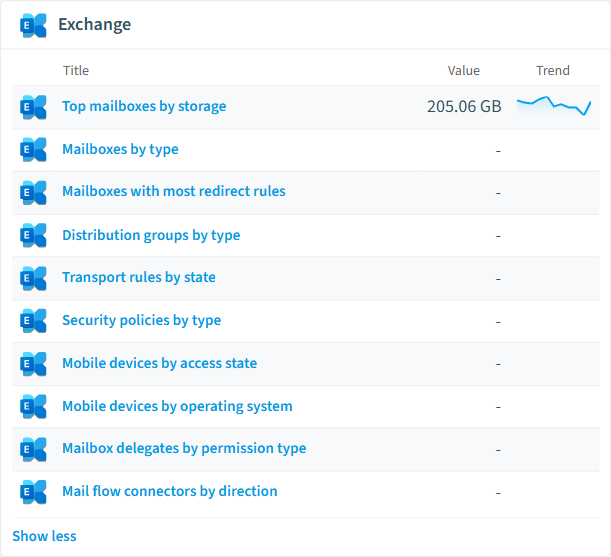
Built-in Exchange Online reports and analytics views in Rencore.
The Exchange Online governance dashboard, summarizing risks and status at a glance.
Why govern Exchange Online with Rencore
Detect mailbox security risks
Identify mailboxes with external redirect rules, excessive forwarding rules, or transport rules that bypass compliance policies. Each violation includes severity and recommended action.
Recover wasted licenses
Find inactive mailboxes (90+ days without send/receive activity) and shared mailboxes without active users. Reclaim Exchange Online licenses by archiving or removing unused accounts.
Prevent storage surprises
Monitor mailboxes approaching their prohibit-send quota and large mailboxes without online archives enabled. Get alerted before users lose the ability to send email.
Enforce naming and configuration standards
Check for mailboxes without required retention policies, rooms without booking restrictions, and distribution lists with stale membership.
What Rencore discovers
Rencore automatically inventories these Exchange Online object types.
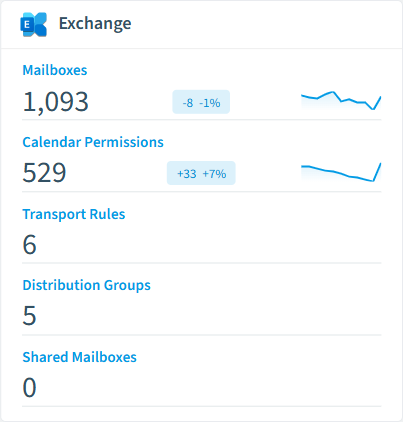
How Exchange governance works in Rencore
Rencore connects to Exchange Online via Microsoft Graph API and inventories every mailbox, distribution list, and transport rule in the tenant. Policies run on a scheduled basis and compare each object against governance rules, flagging violations with severity levels (High, Medium, Low) and providing actionable descriptions.
Who uses Exchange governance
IT administrators use Exchange governance to stay ahead of storage quota issues and mailbox sprawl. Security teams use it to detect redirect rules that could exfiltrate email data. Compliance officers rely on the reports to demonstrate that inactive mailboxes are being cleaned up per retention schedules.
Getting started
Connect your Microsoft 365 tenant to Rencore, and Exchange policies activate automatically. No agent installation required | Rencore reads data through Microsoft Graph with read-only permissions and applies all 31 policies within the first scan cycle.
Policies
31 governance rules that detect violations and risks.
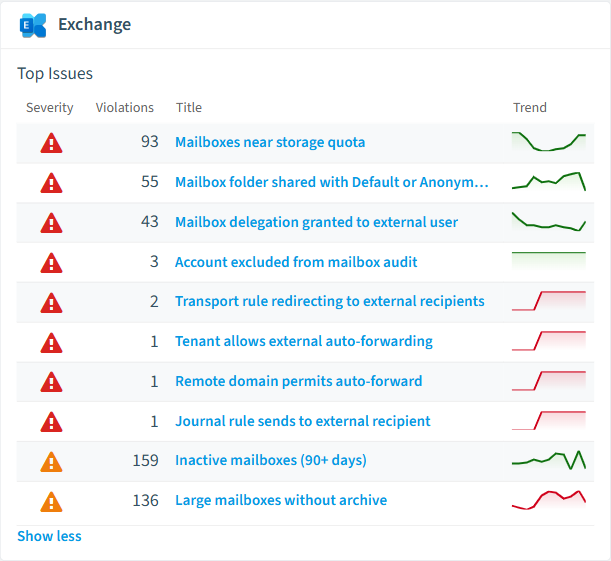
Need a rule that isn't listed? Rencore's Policy Builder lets you create custom policies tailored to your organization.
Reports
14 analytics views and dashboards.
Automations
15 automated remediation workflows.
Segments
35 data groupings for targeted filtering.
Frequently asked questions
What is Exchange governance?
How many Exchange governance policies does Rencore offer?
What is Rencore governance?
Related guides
Trusted by










