
Microsoft 365 Copilot
Rencore monitors Microsoft 365 Copilot across 5 governance policies, 8 reports, and 5 inventories, detecting license waste, adoption gaps, and response accuracy risks.
Rencore Copilot governance is a set of 5 policies, 8 reports, and 5 inventories that audit Microsoft 365 Copilot for license waste, adoption gaps, and response quality risks. It detects Copilot licenses assigned to disabled accounts, inactive users who haven't used Copilot in 30 days, and external connections missing documentation that degrades response accuracy, helping IT maximize ROI on their Copilot investment.
See Microsoft 365 Copilot in Rencore
Every Microsoft 365 Copilot object Rencore discovers and inventories across your tenant.
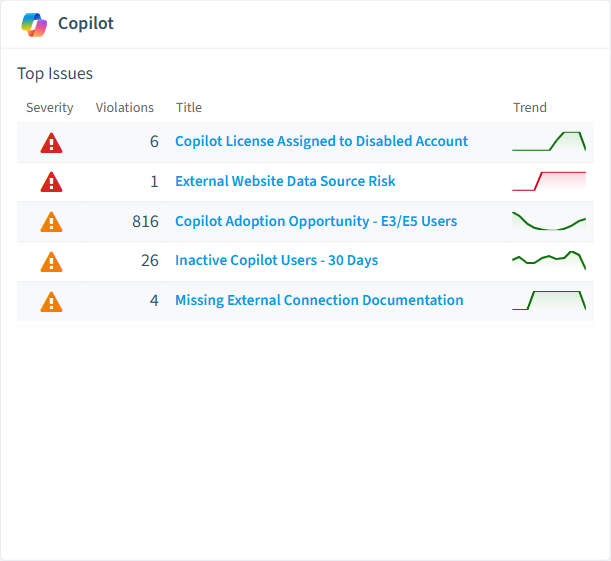
The governance policies Rencore evaluates against Microsoft 365 Copilot, with severity and category.
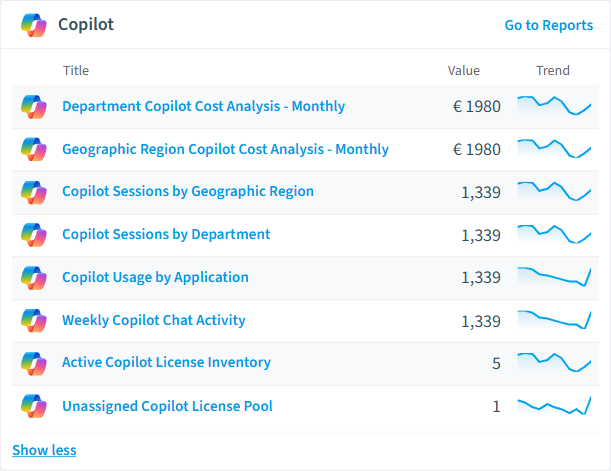
Built-in Microsoft 365 Copilot reports and analytics views in Rencore.
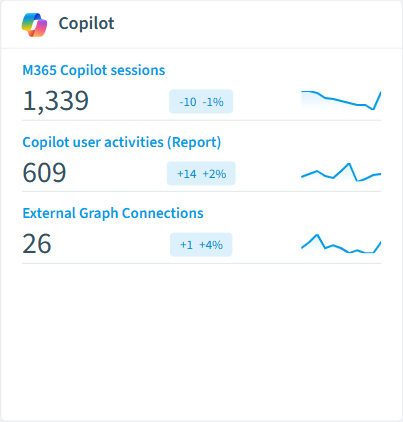
The Microsoft 365 Copilot governance dashboard, summarizing risks and status at a glance.
Why govern Microsoft 365 Copilot with Rencore
Recover wasted Copilot licenses
Detect Copilot licenses assigned to disabled accounts and inactive users who haven't engaged with Copilot in 30 or 90 days. Each recovered license saves your organization approximately EUR 30/month.
Improve response accuracy
Flag external connections lacking descriptions that degrade Copilot's ability to source accurate answers. Undocumented data sources lead to incomplete or misleading responses.
Track adoption and ROI
Reports show Copilot adoption by department, most active users, feature usage trends, and E3/E5 users eligible for Copilot rollout. Demonstrate ROI with concrete usage data.
What Rencore discovers
Rencore automatically inventories these Microsoft 365 Copilot object types.
How Copilot governance works in Rencore
Rencore connects to Microsoft 365 Copilot via Microsoft Graph API and inventories Copilot license assignments, usage activity, external connections, and adoption metrics. Policies run on each scan cycle to detect license waste, adoption gaps, and configuration issues that affect response quality.
The Copilot ROI challenge
Microsoft 365 Copilot licenses cost approximately EUR 30 per user per month. Organizations rolling out Copilot to hundreds or thousands of users need to demonstrate ROI, recover unused licenses quickly, and ensure the data sources feeding Copilot are properly documented. Without governance, inactive licenses accumulate and undocumented external connections silently degrade answer quality.
Who uses Copilot governance
M365 product owners use it to track rollout progress and identify E3/E5 users ready for Copilot. IT administrators recover licenses from disabled and inactive accounts. CISOs review external connection documentation to ensure Copilot responses source from properly governed data.
Getting started
Connect your Microsoft 365 tenant. Copilot policies activate on first scan alongside your existing M365 governance. No separate configuration needed beyond standard Microsoft Graph permissions.
Policies
5 governance rules that detect violations and risks.
Need a rule that isn't listed? Rencore's Policy Builder lets you create custom policies tailored to your organization.
Reports
8 analytics views and dashboards.
Frequently asked questions
What is Copilot governance?
What is Rencore governance?
How do Rencore policies work?
Related guides
- How to govern Microsoft 365 Copilot
- How to build EU AI Act evidence across your AI tools
- How to govern Microsoft Copilot agents
- How to inventory the AI tools in use across your organization
- How to prepare Microsoft 365 for a Copilot rollout
- How to reclaim unused Microsoft 365 Copilot licenses
- How to run recurring access reviews across Microsoft 365 and AI tools
Trusted by










