
Microsoft Foundry
Rencore inventories Azure AI Foundry with 6 inventory types covering projects, hubs, model deployments, and connections for full AI platform visibility.
Rencore Azure AI Foundry governance provides 6 inventories that catalog projects, hubs, model deployments, connections, and resources across your Azure AI Foundry environment. It gives IT and security teams a complete inventory of where AI models are deployed, which data connections exist, and how projects are organized, enabling informed governance decisions as your AI Foundry usage grows.
See Microsoft Foundry in Rencore
Every Microsoft Foundry object Rencore discovers and inventories across your tenant.
Why govern Microsoft Foundry with Rencore
Inventory AI projects and hubs
Catalog every Azure AI Foundry project and hub across your subscriptions. Know which teams are building AI solutions, where they are deployed, and how they are organized.
Track model deployments
See which AI models are deployed, in which projects, and with what configurations. Maintain an up-to-date registry of all active model deployments across your organization.
Map data connections
Inventory the data connections feeding your AI Foundry projects. Understand which data sources are connected to which AI workloads for security and compliance reviews.
What Rencore discovers
Rencore automatically inventories these Microsoft Foundry object types.
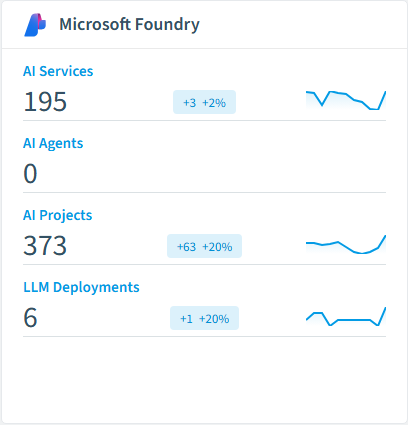
How Azure AI Foundry governance works in Rencore
Rencore connects to Azure AI Foundry via the Azure API and inventories projects, hubs, model deployments, connections, and associated resources. Inventory data is collected on each scan cycle, providing a continuously updated catalog of your AI Foundry environment.
Who uses Azure AI Foundry governance
Heads of IT use the inventory to track which teams are building on Azure AI Foundry and where. CISOs review data connections to ensure sensitive data sources are properly governed. CIOs use project inventories to measure the scale of AI adoption across the organization.
Getting started
Provide Rencore with Azure API credentials scoped to your AI Foundry resources. Inventory collection begins on first scan, covering all projects, hubs, and deployments automatically.
Policies
1 governance rules that detect violations and risks.
Need a rule that isn't listed? Rencore's Policy Builder lets you create custom policies tailored to your organization.
Frequently asked questions
Does Rencore support governance for AI tools beyond Microsoft Copilot?
What is Rencore governance?
How do Rencore policies work?
Related reading
- AWS BedrockRencore monitors AWS Bedrock across 30 governance policies, 15 reports, and 19 inventories, detecting model access risks, cost overruns, and usage anomalies automatically.
- Anthropic ClaudeRencore monitors Anthropic Claude across 26 governance policies, 14 reports, and 11 inventories, covering costs, security, adoption, and data protection for your Claude organization.
- CursorRencore monitors Cursor across 26 governance policies, 3 reports, and 10 inventories, detecting cost overruns, unused seats, and MCP server risks automatically.
Trusted by










